 Atlas
Atlas Feature
Time tracking, to know what each technician actually worked
Your technicians clock in from their own link, with no app to install. Atlas computes net hours, applies each person's rate and exports the record. Atlas does not run payroll.
In short
Clocking in means recording the start, the breaks and the end of a day, so the hours you pay are the hours that were worked, not the ones people remember on Friday evening.
- How they clock in
- A bar at the bottom of the technician's screen, in the link they already have
- To install
- Nothing. No app, no account, no password
- The actions
- Start, break, resume, end
- With no signal
- The tap is kept and sent when service returns, at the time it was made
- Net hours
- End minus start minus the sum of the breaks
- Week
- Monday to Sunday
- Hourly rate
- One rate per technician, with an effective date
- Currency
- The one of the account's country, from Canadian dollars to euros
- Forgotten day
- Closed automatically fourteen hours after the start, and flagged
- Views
- Day, week, month, and one technician alone in a click
- File
- CSV: technician, date, in, out, breaks, net hours, rate, amount
- What the technician sees
- Their hours. Never an amount
In Atlas the technician taps a bar at the bottom of the screen, inside the link they already use. No app to install, no account to create. Atlas computes net hours, end minus start minus breaks, applies that person's rate for that day, and exports a file ready for the bookkeeper. Atlas does no location tracking, no overtime rules and no payroll.
How does a technician clock in with no app to install?
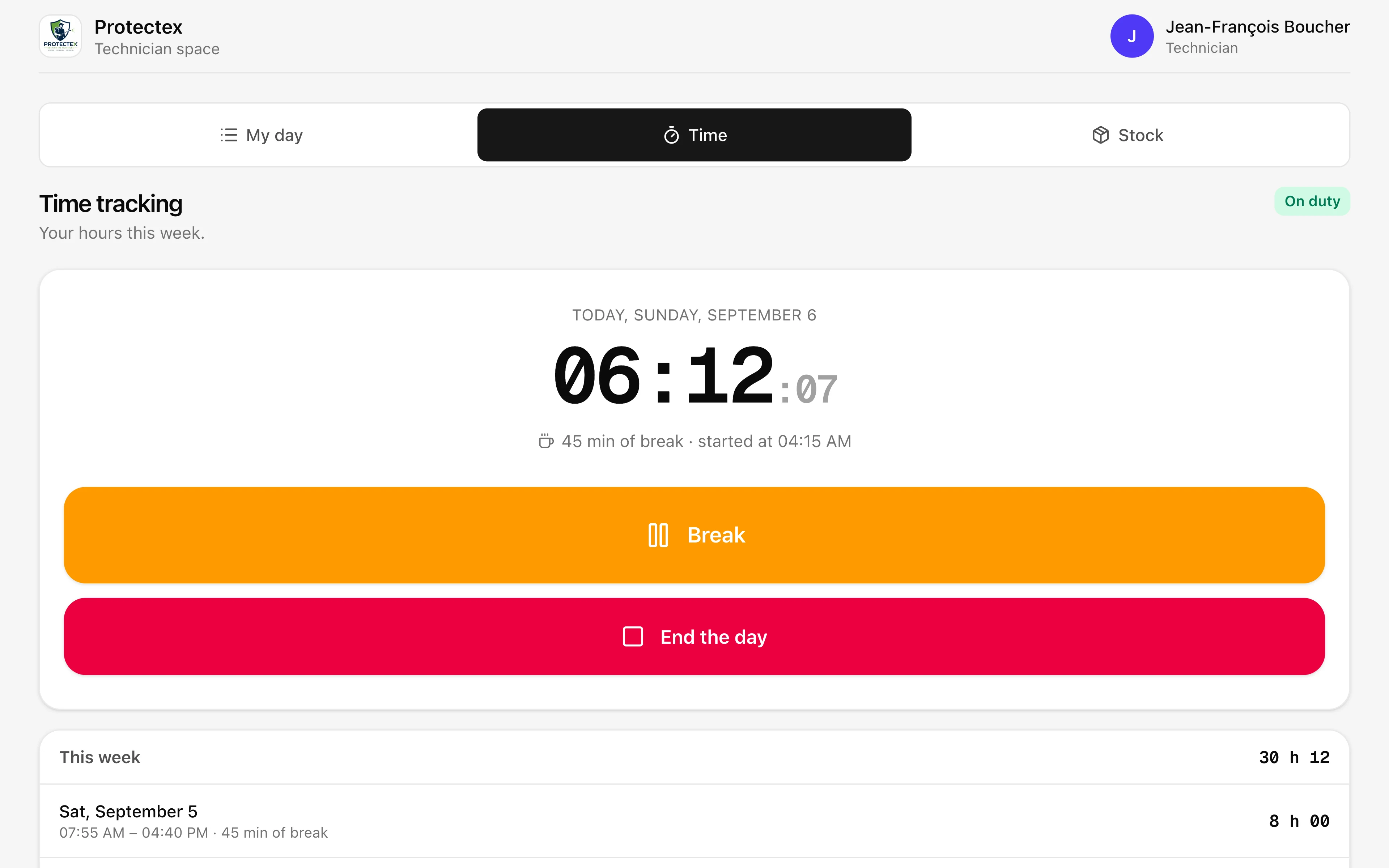
Through the link they already use to see their jobs. A bar appears at the bottom of the screen, offering one button at a time. Nothing to download, no password to remember.
This is where most time clocks fail. Installing an app on five technicians' personal phones, creating accounts, explaining the password, resetting it three weeks later: the time spent rolling the tool out costs more than the time it was meant to save. And the first technician who cannot make it work goes back to paper.
In Atlas a technician gets a personal link. They open it in the morning, see their jobs for the day, and the time bar sits at the bottom of that same screen. It only ever offers one action: "Start my day", then "Break", then "Resume", then "End". There is nothing to figure out.
- They arrive on site and tap "Start"The time is taken at that second. The button becomes "Break", and the bar shows the time running since they arrived.
- They stop for lunch and tap "Break"Break time is counted separately. There can be several in a day, each with its own start and end.
- They resume, and the bar starts againNothing to re-enter, nothing to fix. The day picks up where it left off.
- They end the day with one last tapThe net hours reach the office immediately. No sheet to hand in, no photo to send, nothing to recount on Friday.
One detail that matters for the count: a technician can only open a day if they have a job that same day. A team clocking in on a Sunday by mistake, or from home on a day off, creates hours nobody will ever review.
Does it work with no signal, in a basement or an underground garage?
Yes. The tap is kept on the phone and sent as soon as service returns, carrying the time it was made. Ending at 4 p.m. in a crawl space and finding signal at 5 does not cost an hour of pay.
Pest control technicians spend their day exactly where signal does not reach: crawl spaces, boiler rooms, stairwells, underground garages. That is precisely where most time clocks lose the tap. The screen says "try again", the technician climbs back up, forgets, and the day runs until the evening.
Atlas keeps the tap on the phone, with the exact instant it was made, and sends it by itself when service returns. Nothing to redo, nothing to report. The screen keeps showing the real state: tapping "Break" with no signal shows the break.
What is kept
- The time of the tap, when the button was actually pressed
- The order of the taps, even if they all leave together an hour later
- Several pending taps, sent one after the other
What is not kept
- The time of sending, when the phone finally got through
- A phone clock wound back by hand: the server bounds what it receives
- A tap that no longer makes sense on arrival, like a break already recorded
How do hours become an amount?
Each technician has an hourly rate with an effective date. Atlas multiplies their net hours by the rate that applies to that day, and shows the total in the currency of the account's country.
The effective date is what separates real time tracking from a spreadsheet. Giving someone a raise on March 1st must not rewrite what their February week was worth. In Atlas a rate is set with the day it starts applying; earlier weeks keep the previous one, with nobody having to do anything.
- One rate per person
- An apprentice and a certified technician do not cost the same. The rate is changed from the time tracking screen, without touching days already recorded.
- The currency follows the account's country
- An account in Montreal counts in Canadian dollars, one in France in euros, one in the United States in US dollars. The symbol, its position and the decimal mark all differ, and a timesheet that gets one of the three wrong gets double-checked every time.
- A day with no rate says so
- If no rate has been set for someone yet, their hours still show and the amount column stays empty, with a warning. A silent zero would be worse.
- The technician sees no amount
- Their screen shows their hours, never what they are worth. Pay is between them and the office, not something displayed on a job site.
What happens when a technician forgets to end their day?
Atlas closes the day fourteen hours after the start and marks it in orange. It counts towards the total, but stays flagged until somebody corrects it, and the screen says how many days are in that state.
This is the most common incident with any time clock, and the most expensive. Someone forgets to tap "End", the timer runs all night, and on Monday morning the week shows thirty-two hours too many. With no safeguard those hours end up in payroll, or in an unpleasant conversation.
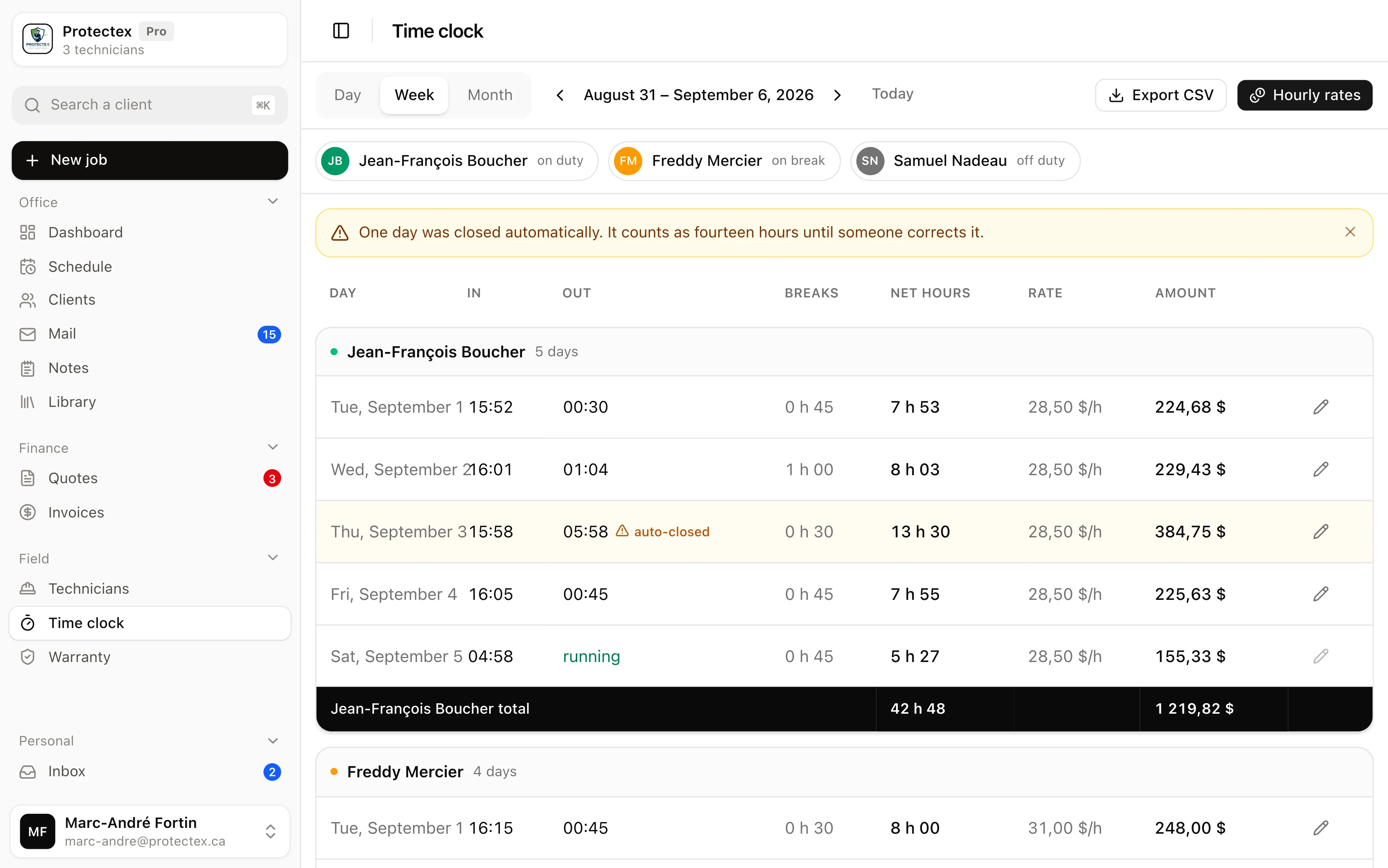
Fourteen hours after the start, Atlas closes the day by itself and marks it "closed automatically". A banner at the top of the screen says how many days are in that state over the period shown, and it dismisses in one click once they have been handled. The correction is made by hand, with the real end time, and the fact that it was corrected stays visible.
What does the office see, and what can it correct?
One card per technician, their days line by line, and their total on black. You switch from day to week to month, isolate one person in a click, and export the file for payroll.
The top of the screen answers the question you ask twenty times a day: who is working right now. One pill per technician, on shift, on break or off. Clicking one keeps only their hours, in the table, in the totals and in the exported file.
- Correcting a day
- Start time, end time, break minutes and a note. A corrected day says so on screen: this is a timesheet, not a draft.
- The file for the bookkeeper
- A CSV export with technician, date, in, out, breaks, net hours, rate and amount. The currency is written in the column headers, and the numbers leave without a symbol so the spreadsheet can add them up.
- Day, week or month
- The week runs Monday to Sunday. Worth knowing for a bookkeeper used to Sunday-to-Saturday: the boundaries will not fall in the same place.
- The total on black
- Each card closes on that technician's hours and amount, white on black. On a screen with fifteen days, it is the one line people are actually looking for.
Can hours disappear?
No, and that is not just an intention. The database refuses to delete a technician who has hours, and the browser has no right to delete a day.
A timesheet is a record: it is what proves what is owed, and what you pull out the day someone disputes their pay. In many tools, removing an employee who resigns wipes everything they did along with them, without a word. The owner's normal gesture destroys the last pay they still owe.
In Atlas, removing a technician from the team records their departure. Their link stops working instantly and they leave the assignment lists, but their days, breaks and rates stay readable and exportable. Deleting a day from a browser is refused by the database itself, not merely hidden in the screen.
What time tracking does not do
- No location tracking. Atlas records when a tap was made, never where. It does not replace on-site attendance control.
- No overtime, premium or bonus calculation. Net hours are delivered as they are.
- No payroll is produced: no payslip, no deductions, no filing. The amount shown is a cost indication, not net pay.
- Time is not split per job. Atlas counts a day, not a stopwatch per site.
- There is no approval step. A day is corrected, not approved.
- Hours leave as a CSV file. There is no direct push to a payroll system.
- A technician can only open a day if they have a job that same day.
Frequently asked questions
No. Time tracking lives inside the link the technician already uses to see their jobs, as a bar at the bottom of the screen. There is no app to download, no account to create and no password.
Net hours equal end time minus start time minus the sum of the breaks. Breaks are counted separately, with their own start and end, and there can be several in a day.
Yes. The tap is kept on the phone and goes out by itself when service returns, carrying the time it was made. A technician who ends in a basement and finds signal an hour later does not lose that hour.
Yes, one rate per person, set with an effective date. Rates are changed from the time tracking screen.
No. The rate applied to a day is the one whose effective date is the most recent before that day. A raise never rewrites a week already paid.
Yes, as a CSV file for the period shown. It contains technician, date, in, out, breaks, net hours, rate and amount, with the currency stated in the headers.
No. Their screen shows their hours, never an amount.
Atlas closes the day fourteen hours after the start and flags it as closed automatically. It waits for a correction, and the screen says how many days are in that state.
See time tracking for real
The demo opens with no account. Look at a week of three technicians, isolate one, export the file.