 Atlas
Atlas Feature
The service report, filled in the field and delivered to the client
The technician fills a guided questionnaire from their phone, the office reviews and approves, and the client gets a clean PDF in their portal. Atlas writes nothing for you.
In short
A service report is the record of a visit: what was treated, where, with what, and what the client needs to know next.
- Who fills it
- The technician, from the link they already have, with no app to install
- How
- A guided questionnaire, one question at a time, following your template
- The template
- Built in an editor: pages, questions, required pages, photos
- The states
- Draft, submitted, approved, correction requested
- The review
- The office approves or sends back for correction, never the technician alone
- On approval
- PDF built, sent to the client and published in their portal
- Photos
- Only those marked visible reach the client
- The trail
- Every state change is kept: who, when, why
- Once approved
- The report is locked, like a sent quote or invoice
- Open to
- Every account
In Atlas, the technician fills it from their phone, guided question by question, following the template you built. The office reviews, requests a correction or approves. On approval, Atlas builds the PDF, sends it to the client and publishes it in their portal. Atlas does not write the report for you and invents no answers: it structures, it flags what is missing, it delivers.
How does the technician fill a report in the field?
From the link they already use to see their route. The report opens as a guided questionnaire, one question at a time, in the order of your template. Nothing to install, nothing to write from scratch.
The report written at night, from memory, on a corner of the table, is the report that forgets half of what matters. Atlas has it filled on site, while the technician still sees the unit. They open the job, the questionnaire unfolds, and each page waits for its answer before the next.
The questionnaire is not fixed by Atlas: it is YOUR template. You decide the pages, the questions, which ones are required, the photo fields, and the questions that appear only depending on an answer. The technician just answers.
- They open the job and start the reportThe questionnaire begins on the first page. What the file already knows is carried over, they do not retype it.
- They answer, page after pageA required page cannot be skipped. A requested photo is taken on the spot. An answer can open a follow-up question.
- They submitThe report leaves the draft and reaches the office, ready to review. The technician has nothing else to do.
Who reviews the report before it reaches the client?
The office. A submitted report has not gone out yet: a manager reviews it, then approves it or sends it back to the technician with the reason for the correction. The client only receives what has been validated.
A report that goes straight from the field goes with its typos, its missed boxes and its rough wording. Atlas puts a review between the technician and the client. The manager sees the report as it will be, and decides.
What the office can do
- Approve: the report becomes a PDF, goes to the client and publishes in their portal
- Request a correction, with the reason, which returns to the technician
- Follow each report's state: draft, submitted, approved, correction
What cannot happen
- A report going out without a manager approving it
- An approved report quietly edited: it is locked
- A state change with no trace of who did it, and when
Every move from one state to another is kept: who submitted, who approved, who asked for a correction and why. Six months later, the report's history answers "who validated this" on its own.
How does the client receive their report?
On approval, Atlas builds the PDF, sends it to the client and publishes it in their portal, where they find it whenever they want. Only the photos marked visible to the client appear.
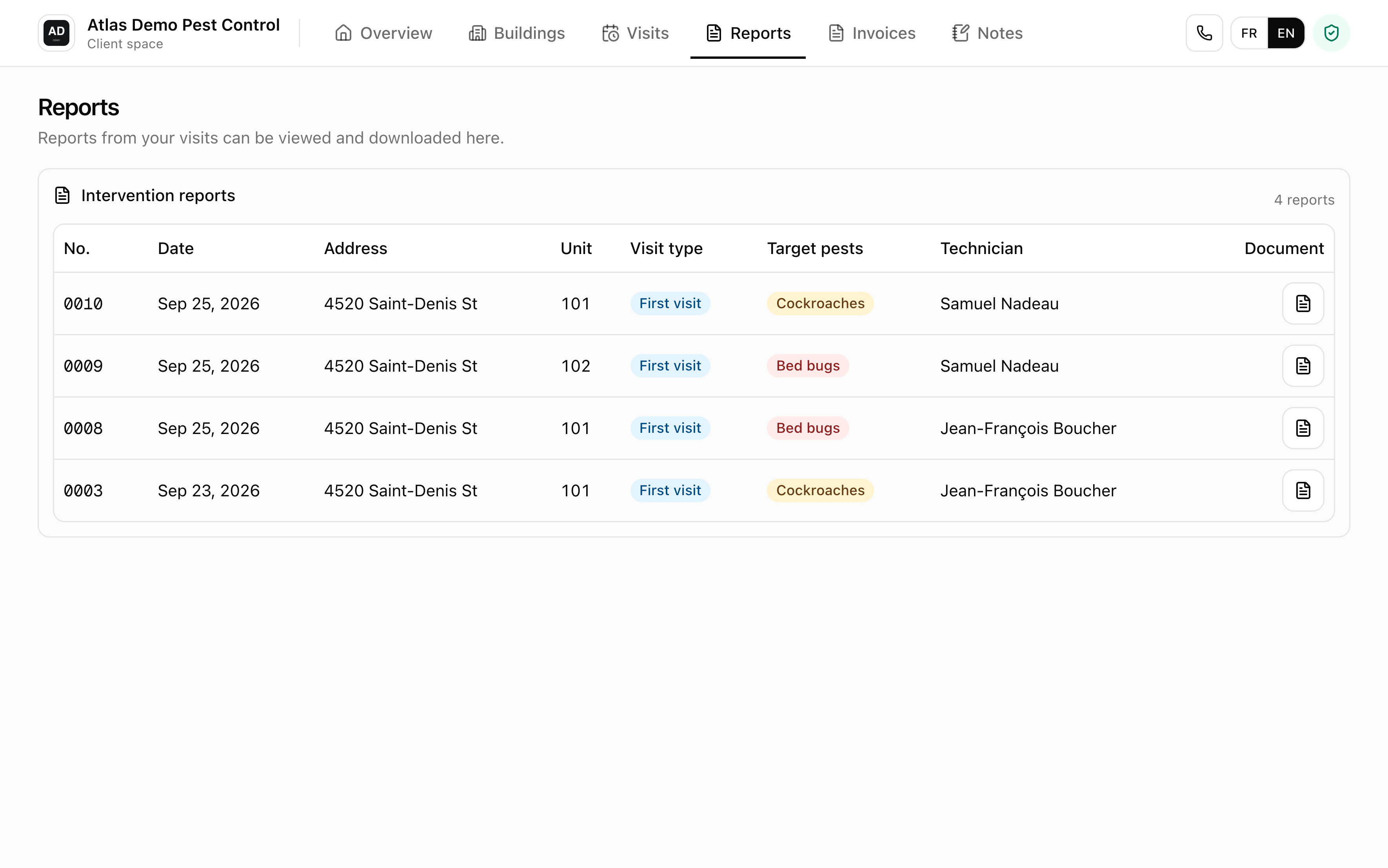
The approved report becomes a clean document, under your letterhead, that the client can open, download and print. It reaches them and stays filed in their portal, next to their visits and documents, without them having to call you for another copy.
Photos are a choice, not a dump. The technician can take as many as they want; only those marked visible to the client go out with the report. What serves the internal file stays in the internal file.
What Atlas does not do
- Atlas does not write the report for you and fills no answer on its own. It guides and structures, the content comes from the technician.
- The technician does not send a report to the client themselves: they submit it, and the office approves.
- An approved report is locked. It is not corrected afterwards: if something must change, you make a new one.
- Atlas does not replace your judgment on what to write: your region's regulatory framework still has to be checked against the official text.
Frequently asked questions
No. They fill the report from the link they already use to see their route. Nothing to download, no account to create.
Yes. You build the template in an editor: the pages, the questions, which ones are required, the photo fields, and the questions that appear only depending on an answer. The whole team then uses it.
They receive it as soon as a manager approves it. At that point, Atlas builds the PDF, sends it to the client and publishes it in their portal. Nothing goes out before approval.
Yes, intervention reports are open to every account.
Watch a report go from the field to the client
The demo opens with reports already filled, from the technician's questionnaire to the PDF in the client's portal.