 Atlas
Atlas Feature
Quotes, from the form to the customer's answer
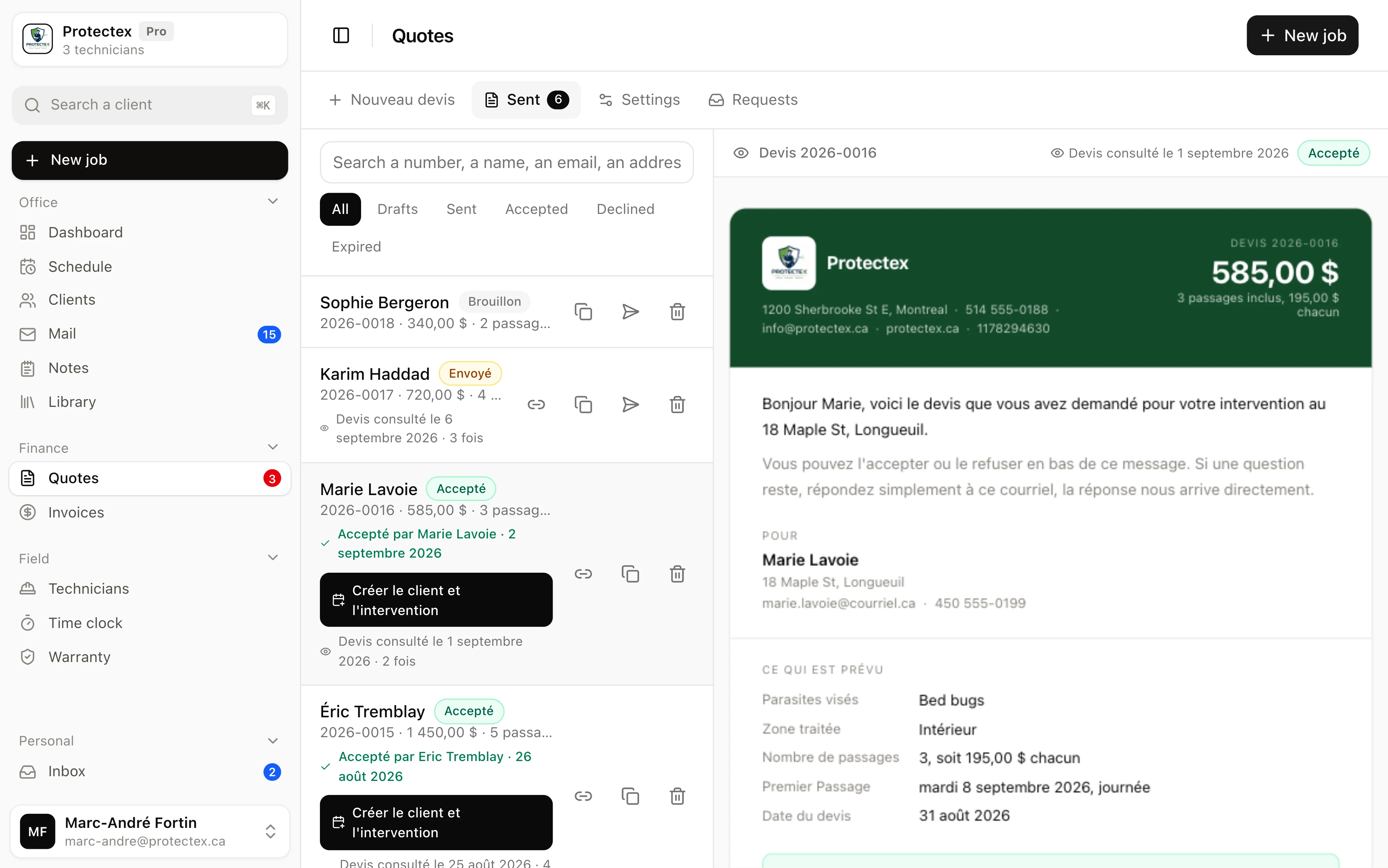
Write a quote in Atlas, see exactly what the customer receives beside it, send it under your own name. The prospect accepts or declines in one click.
In short
A quote is the first document a company sends to someone who is not a customer yet.
- Live preview
- The customer's exact email, beside the form, redrawn as you type
- Pests
- 37 pests in 5 families, from crawling insects to raccoons
- Price
- One total and the number of visits it buys
- Date
- A first visit and a time of day, or « to be agreed »
- Sending
- By email, under your company's name, replies come to you
- Customer answer
- Accept or decline, on one page, with no account
- Tracking
- Opened or not, when, and how many times
- Attachments
- Your warranty policy and your cancellation policy, as PDFs
- Colour
- The header band and the accept button take your company's
- Validity
- Thirty days, written on the quote
- From your website
- A form pasted in one line; requests land next to the quotes
Atlas writes it, emails it under your company's name, and gives the prospect a link where they accept or decline. You see its state without chasing: sent, opened, accepted or declined. Your warranty and cancellation policies travel with it as linked documents. Atlas computes no tax on the quote, takes no deposit, and does not automatically chase a quote left unanswered. Turning an accepted quote into an invoice stays a decision you make.
Why does seeing the quote while writing it matter?
Because a quote goes out once. You do not fix a typo inside someone's inbox, and a badly formatted price loses trust before the reading even starts.
The screen is split. The form on the left, the email the customer will receive on the right, redrawn on every keystroke. It is not an approximation: it is the same document, produced by the same code, with your logo, your details and your colours. A mistyped amount, a missing name, a note that runs long, all of it shows before you press Send.
On a phone the two do not fit side by side: a toggle switches between form and preview, and the quote shows in full, scaled down, never cut.
What goes into a quote?
The customer, what you are treating, when, and how much. Nothing more, because a pest control quote needs nothing more.
- The customer
- Their name, email, phone, and the address you are treating. That is what appears at the top of the quote.
- The pests
- Picked from a list of 37 grouped by family. Several on one quote if the unit has several.
- The area treated
- Inside, outside, or both. Two checkboxes rather than three choices, because « both » is not a third place.
- The first visit
- A date and a time of day, morning, afternoon or full day. Or nothing, and the quote says « to be agreed with you ».
- A note for the customer
- The preparation to do the day before, the alley entrance, the caretaker's hours. It shows in a box on the quote.
- The price
- One total and the number of visits it includes. The price per visit is worked out for you.
« $720 » means nothing to someone comparing three offers. « $720 for four visits, $180 each » can be compared, and that is what the quote says.
Which pests can a quote cover?
Thirty-seven, in five families, including the wildlife many Quebec exterminators trap.
- Crawling insects
- Cockroaches, ants, carpenter ants, spiders, silverfish, earwigs, sowbugs, millipedes, beetles, boxelder bugs, booklice, termites.
- Biting pests
- Bed bugs, fleas, ticks, mites, mosquitoes.
- Flying insects
- Wasps, hornets, bees, bumblebees, house flies, fruit flies, drain flies, gnats, pantry moths, clothes moths.
- Rodents
- Mice, rats, squirrels, chipmunks, groundhogs.
- Wildlife and birds
- Raccoons, skunks, bats, pigeons, starlings. Not chemical treatment, but it comes from the same phone call and is quoted the same way.
A quote can carry several. They appear in the email, and in its subject line too: « Your quote 2026-0004 · Bed bugs ». A customer who asked three companies the same week cannot tell two reference numbers apart, but recognises the pest.
Which address does the quote come from, and where do replies go?
It goes out under your company's name, from an Atlas address, and replies come back to you.
Your prospect sees « Your Company » in their inbox, not « Atlas », a name they have never heard. The technical address behind it belongs to Atlas, because that is the domain verified with the mail providers, and that is what keeps the quote out of the junk folder. Nothing to configure on your side, no DNS record to add, your first quote goes out the day you sign up.
If they reply « Tuesday works », the reply lands in your inbox, not in Atlas's.
How does the customer accept?
They open a link, read the whole quote, and click accept or decline. No account to create, nothing to install.
Both buttons sit at the bottom, after the warranties and the terms: they walk past what they are accepting before accepting it. To accept, they type their name. A button alone proves nothing six months later; a name written by hand, with the date, does, and it costs four seconds to someone acting in good faith.
An acceptance is final. The buttons are gone for good, even on reload or from the original email, and they can neither accept twice nor change their mind by clicking the other one. A decline can be taken back. Their page keeps a « that was not intended, go back » button that returns the quote to the sent state and emails you that the refusal has been lifted, because one unlucky click should not force a phone call to get a new document.
And you get an email either way, accepted or declined. A known no beats silence: without it you would chase for three weeks someone who has already signed elsewhere.
What about my warranties and my cancellation terms?
You upload your two PDFs once, and every quote links to them. Your insurer's or your lawyer's, not Atlas's.
Two attachments, the warranty policy and the cancellation policy, uploaded in the Settings tab of the Quotes screen. Until you upload one, Atlas attaches a standard warranty document, so your first quote is complete anyway.
One thing that matters: the documents are copied onto each quote at send time. A company that changes its terms in June does not rewrite the March quotes, they carry the ones it had accepted that day. That is exactly what counts if someone disputes a fee six months later.
How do I know if the customer looked at it?
The list says « Quote viewed on August 7 · twice », or « Quote not viewed yet ». The wording matters: what is recorded is the CLICK on the quote, not the email being opened.
What is counted is the opening of the quote PAGE, not of the email. Tracking pixels no longer say anything useful: Gmail loads images through its own servers and Apple Mail preloads them even when nobody has read anything. They report opens that never happened and miss others. An opened page is a gesture, somebody clicked. It is narrower, and it is true.
Does the quote look like my company?
Your logo, your details, your colour. The header band and the accept button take it.
Eight shades offered plus a free choice. The header text adapts on its own: on a light colour it turns dark, worked out from the actual luminance rather than by eye. A yellow band with white text cannot be read, and that is the kind of thing you only discover once the quote has gone.
Where does the quote come from when nobody called?
From your website. One line pasted there adds a quote request form, and every request lands in Atlas, in the quotes screen, with an email to tell you.
Someone looking for an exterminator at 10 p.m. does not call. They check three websites, find two of them silent, and write to the one that asks them questions. The Atlas form exists to be that one.
- You paste one line on your websiteOne tag, once, on every page. It carries your key, which grants no read access at all, only the right to send you a request. The form itself lives at Atlas: whatever improves there reaches you without anyone pasting anything again.
- The visitor fills it in one minuteFirst and last name, phone, email, address, the pest, indoors or outdoors, and up to three photos. Everything is required except the message and the photos, because a half-filled request forces you to call back and ask the same questions.
- The request lands with youIt goes into the Requests tab of the quotes screen, with a red counter that only goes out when you act on it. An email leaves at the same moment, with a tappable phone number and the photos, so you can call back from the truck.
- One click and the quote is ready« Create the quote » copies the name, phone, email, address, pest and zone into the quote form. Only the price, the date and the note are left. The request marks itself handled when the quote goes out.
The address field completes as they type, against real addresses, which avoids the misspelled street you then have to sort out on the phone. Photos matter most outdoors: a wasp nest under a soffit six metres up and one behind a shutter are not the same job, and nobody says so on the phone.
The form drops into WordPress, Wix, Squarespace, Shopify or a hand-built site. It looks the same everywhere, because it is isolated from the host site's stylesheet. Three safeguards keep robots out: only your domain may use it, an invisible decoy field catches automated fills, and an hourly ceiling prevents flooding.
What quotes do not do
- No tax is calculated. The amount you write is the amount shown, tax included or not, and it is up to you to say so in the note.
- One service line per quote. No itemised breakdown, no subtotals.
- An accepted quote does not turn into an invoice on its own. Atlas does invoice, but the invoice is entered separately, and it connects to no accounting tool.
- No deposit, no online payment. The customer accepts, they do not pay.
- A quote left unanswered is not chased automatically. You see it is still « sent », the follow-up is yours.
- Acceptance does not fill your week on its own. One button creates the customer record and the first visit, the rest of the series is still placed by hand, since Atlas does not know its rhythm.
- The signature is a typed name with its date and timestamp, not a legally certified electronic signature.
- Three sends maximum per quote, so the feature does not become an email tap.
Frequently asked questions
No. They open a link from the email, read their quote, type their name and click. Nothing to install, nothing to create. The link is long and unpredictable, it is the only lock, and it is the same one the client portal uses.
No, on purpose. A sent document is a photograph of what was proposed that day. You can resend it twice more, since the first send counts towards the limit of three, or start a new one from its content with its own number. A sent quote cannot be deleted either, otherwise its number would go back into the queue and two identical documents would circulate.
No. Atlas shows the amount you write, untouched. If your prices are before tax, say so in the quote's note, which exists for that. It is a limit of the quote, not of the product. The invoice does work out your taxes and prints your registration numbers.
The quote turns to « declined », you get an email, and both buttons disappear from their page. It is not final though: their page shows a « that was not intended, go back » button that returns the quote to the sent state and tells you the refusal has been lifted. A genuine no is what saves you from chasing for three weeks someone who has already picked another company.
The quote turns to « accepted », you get an email, and a button appears to convert it. In one click Atlas creates the customer record if it does not exist yet, looked up first by email then by name, and places the first visit in the schedule on the date sold, with the amount and the number of visits recalled in its note. The following visits are still scheduled by you, since Atlas does not guess their rhythm.
Yes, that is how it is meant to work. You upload your two PDFs in the Settings tab, warranty policy and cancellation policy, and every following quote links to them. Atlas only provides a standard document for warranties, and only while you have uploaded nothing.
Write a quote and watch it draw itself
The live demo opens with six quotes, two accepted and one declined. No account, no credit card.