 Atlas
Atlas Feature
Invoicing, from the price you type to the email your client opens
Write the invoice, see the exact email your client will get, send it with its PDF. Sales taxes calculated, numbering that never skips, issued invoices locked.
In short
An invoice is an accounting record: once it reaches the client, it cannot be edited, and its number is never reused.
- Entry
- Client, address and unit taken from your own tree, service, price before tax
- Taxes
- Up to two lines, each with its rate and registration number, based on where you invoice
- Canada
- GST and QST in Quebec, HST where it applies, GST plus provincial tax elsewhere
- Elsewhere
- State sales tax in the US, VAT in France, or no tax at all
- Preview
- The client's email, with sender, subject and attachment, redrawn as you type
- Attachment
- The invoice as a PDF, drawn by the same code as the preview
- Number
- Assigned when issued, never when saved, with no gap in the sequence
- Lock
- An issued invoice cannot be edited, cannot go back to draft and cannot be deleted
- Payment
- Check payable to, mailing address, transfer details, and the number to reference
- States
- Draft, issued, paid, canceled, and overdue past the due date
- Reminder
- One click, three sends at most, the subject says «Reminder» from the second one
- Report
- A service report PDF can travel with the invoice
Atlas writes it from your clients and addresses, works out the taxes of your province, state or country, shows you the exact email your client will receive, then sends it with the invoice attached as a PDF. The number is only assigned when you issue it, and from that moment the database itself refuses every edit, every step backwards and every deletion. Contracts build their own invoice on the date you set, and unpaid invoices are chased without you. Atlas does not take card payments, does not do your bookkeeping and syncs with no accounting software.
Why show the client's email while you write the invoice?
Because an invoice cannot be taken back. It goes out once, it is read by somebody's accounting desk, and a mistake in it costs a phone call, a correction and often a late payment.
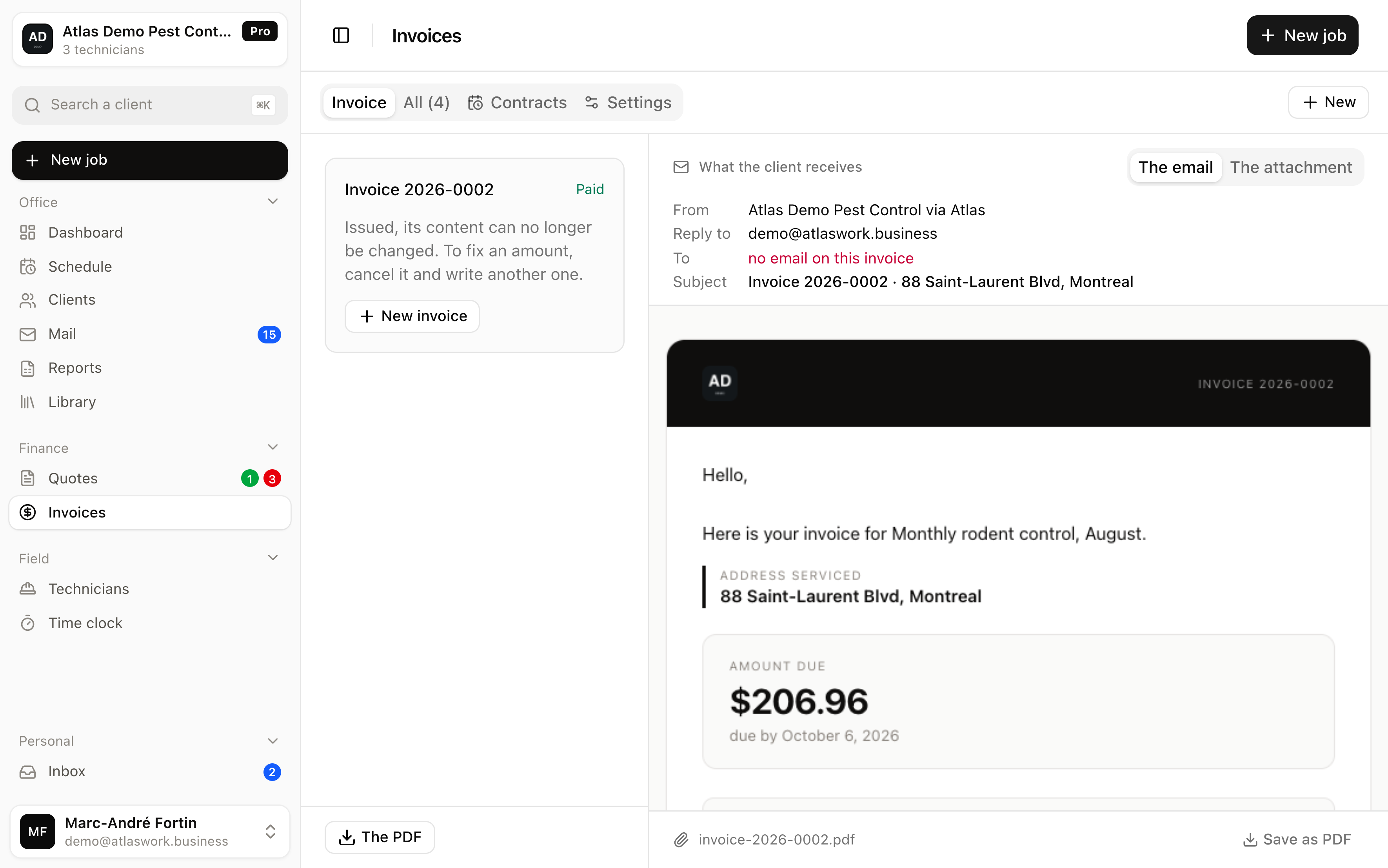
The screen is split. The form on the left, and on the right not a floating document but the message as it will land in the client's inbox, with sender, recipient, subject and attachment. That is the window you will recognize, because it is the one your client opens.
A second tab shows the attachment itself, the invoice as a real PDF rather than a picture of one. Both matter: the message decides whether it gets opened, the PDF is what the client keeps and hands to their accountant.
- The same code on both sides
- The PDF you check before sending is drawn by the code that produces the one in the email. It is not an approximation, it is the same file.
- The email does not repeat the invoice
- It says hello, states what is being charged, shows the amount and the due date, points at the attachment and gives the ways to pay. A client reads that in ten seconds.
- A missing recipient shows up first
- If the invoice has no client email, the «To» line says so in red, before you send rather than after.
How are taxes calculated?
From what you set once, never from a rate hard-coded in the software. You pick where you invoice, Atlas suggests the taxes collected there, you check them and add your registration numbers.
Your account country sorts things first. A Canadian account opens on the provinces, with federal GST and provincial tax kept apart where they are, and HST where they are merged. A US account opens on the states, a French account on VAT. The province and the state are chosen, not guessed: suggesting Quebec to an Ontario company would charge 14.975% instead of 13, and nobody rereads a field that is already filled in.
- Two lines, not one
- Quebec collects GST and QST, each with its own registration number, and both must appear separately. Ontario has only one. A business below the registration threshold shows none.
- QST is not charged on GST
- It applies to the pre-tax subtotal. The opposite was true before 2013, and many templates still carry the old rule, which makes a total twenty-five cents too high on a $500 invoice.
- Registration numbers print under the total
- That is what lets a business client claim its input tax credits. Without them, they call you.
- Rates are copied onto the invoice
- A rate that changes next year does not rewrite this year's invoices. Reading last year's invoice shows last year's taxes.
What stops an invoice from being changed afterwards?
The database, not the screen. A screen is worked around with two tabs; the rule that protects an accounting record belongs where nobody can step past it.
While it is a draft, everything can be fixed, and a draft has no number yet. It gets one the moment you issue it. That is what stops an abandoned draft from taking a number with it and leaving a permanent gap in the sequence, which is exactly what an audit looks for.
Still possible after issuing
- Mark the invoice paid, with how the money came in
- Cancel it, it stays visible, struck through, and keeps its number
- Write an internal note the client never sees
- Attach the service report afterwards
- Send it to the client again, three times at most
No longer possible
- Change the amount, the taxes or the currency
- Change the recipient, the address or the date
- Edit the payment details printed on it
- Turn it back into a draft to rewrite it
- Delete it
If the amount was wrong, you cancel it and write another one. That is what an accountant expects, and it is what holds up if somebody disputes the charge six months later.
How does the client know how to pay you?
You write it once in the settings, and it prints on every invoice, in the PDF and in the email alike.
- The name for the checkOften the full legal name, which is not the trading name on your logo. A check made out to the wrong name comes back by post two weeks later.
- Where to mail itThe address of the day it was issued, frozen on the invoice. Moving in June does not send March's checks to the new address.
- Where to transferIn Canada, the Interac transfer email. Elsewhere, your bank details.
- The number to referenceAdded on its own under the payment methods. Without a reference, a $574.88 transfer arrives from a name that is not always the client's, and you have to call to find out what it settles.
The block disappears on its own once the invoice is marked paid. Leaving it there would read as a second request, and that is the kind of misunderstanding that costs a refund.
How do you know what is still owed?
The list shows every invoice with its state, and an issued invoice past its due date turns overdue on its own.
- Draft
- No number yet, nothing has gone out, everything can be fixed or deleted.
- Issued
- The number is taken, the content is frozen. The terms you allow set the due date.
- Overdue
- Issued, unpaid, past due. The due date itself does not count, the client has until the evening.
- Paid
- With the date and how it came in, transfer, check, cash or card.
- Canceled
- Struck through, still visible, number kept.
Each row's menu only offers what makes sense at that moment. You do not chase a draft, you do not delete an issued invoice, and «mark as paid» disappears once it is.
A quarterly contract, do I have to re-invoice it by hand?
No. A contract is an invoice template plus a frequency, and the invoice builds itself on the date you set.
- Every month, or every year
- Six rhythms offered, from monthly to yearly, and any value between 1 and 24 months if none of them fits.
- Left as a draft, or sent outright
- You choose per contract. As a draft, you read it over before it goes. On automatic sending, the client receives it without you touching anything.
- The signed contract travels with it
- You attach the contract PDF to the template and it goes out with every invoice. A property manager who disputes a charge has the paperwork in front of them.
- Pauses without losing anything
- A paused contract stops invoicing and keeps everything. It picks up the same rhythm when you resume it.
The contract's date moves forward BEFORE the invoice is built, never the other way round. A failure at the wrong moment leaves you, at worst, with a contract not invoiced that month, never with two invoices for the same month at the same client. The first costs one click, the second costs a refund and an explanation.
And the clients who do not pay?
Atlas chases them for you, at a reasonable hour, and it stops on its own before it becomes pushy.
- You set the delay
- The reminder only goes out a set number of days after the due date, which you configure once. Before that, Atlas says nothing.
- At nine, your time
- In your company's time zone, not the server's. A client in Vancouver is not chased at six in the morning.
- One a week, three at most
- Never two reminders within seven days on the same invoice, and three sends in total. After that Atlas goes quiet and it is on you to pick up the phone.
- It stops when the invoice is paid
- Mark it paid and the remaining reminders fall away by themselves.
It is a switch, not a default. Until you turn it on in the settings, no reminder goes out, and Atlas never writes to a client of yours without you having decided so.
What Atlas invoicing does not do
- No card payments. The client pays as before, by check, transfer or on your terminal, and you tick «paid».
- No invoice created on its own from an accepted quote or a finished job. A contract's invoice, on the other hand, does build itself.
- No deposits and no partial payments. An invoice is paid or it is not.
- No calculated discount. You adjust the price of the line, the rebate does not show up as such.
- No bookkeeping, no accounting export, no sync with accounting software.
- No separate credit note. You cancel the invoice, which keeps its number and stays visible.
- No public page per invoice. The client receives their PDF, and if they have a portal they find their invoices there.
Frequently asked questions
Yes, from the rates and registration numbers you enter once. QST is calculated on the pre-tax subtotal, not on the subtotal plus GST, and both numbers print under the total so your business clients can claim their credits.
No. Its number, amount, taxes, recipient and date are frozen by the database itself. If the amount was wrong, you cancel the invoice, which stays visible and keeps its number, and you write another one.
Yes. The email carries a short message with the amount, the due date and how to pay, and the invoice is attached as a PDF. It is the same file shown in the preview before sending.
Yes. Canadian provinces, US states and France are offered based on your account country, with the name the tax number carries there. In the US no rate is filled in for you, because many states do not tax this service and elsewhere county and city taxes add up. The line is called « Sales tax » and you enter your full rate if you have one.
No. Atlas produces and sends the invoice, payment happens as before, and you mark the invoice paid with how the money came in.
Nothing at all. A draft has no number, it never reached anyone, and deleting it leaves no gap in the invoice sequence.
Try invoicing
Five days to write a real invoice, send it and see what your client receives.