 Atlas
Atlas Feature
Notes, for everything that does not fit inside a job
A notepad inside Atlas for door codes, building quirks and the day's to-dos. Each note links to a client, can be pinned, and is found by search.
In short
A note is the useful information that fits nowhere else: a door code, the caretaker's name, a client instruction, something to order.
- What goes in
- Formatted text, bullet lists, and to-dos you tick off
- Linking
- To a client, whose name shows on the note and in the list
- Pinning
- Pinned notes stay at the top of the list
- Search
- Across title, text and to-dos
- Saving
- Automatic, there is no Save button
- Where it lives
- In your account, so notes follow you from one device to another
- Sharing
- None, a note stays private, the team does not see it
- On phone
- Yes, the list then the note, one screen at a time
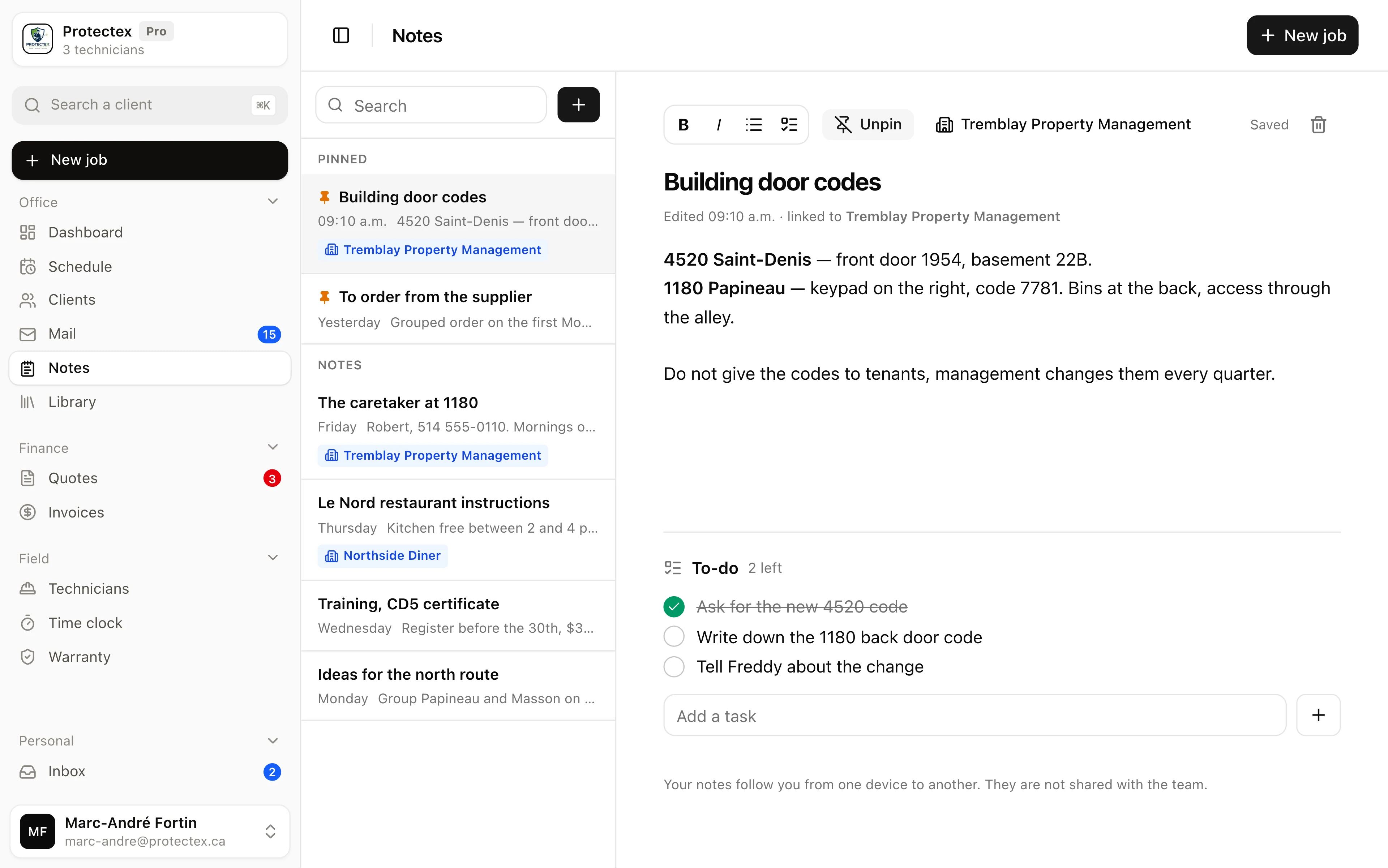
Atlas gives it a place, right next to the schedule and the client records. Each note has a title, text you can format, to-dos you can tick off, and can be linked to a client. Notes are searchable, can be pinned, and follow you from one device to another since they are saved to your account. Atlas sends no reminder for a to-do, does not share notes with the team, and accepts neither photos nor attachments.
Why keep notes in Atlas rather than somewhere else?
Because the information is needed at the moment you look at the schedule. A note kept in another app always arrives too late, when the technician is already at the door.
The door code for 4520 only matters at two moments, when the route is prepared and when someone is standing in front of the building. If it lives in the owner's phone notes, in a message thread or on a sticky note, it is missing at exactly those two moments. The technician calls the office, the office digs around, and the day loses twenty minutes over something somebody already knew.
A note written in Atlas sits with the schedule, the client records and the history by address. It opens in two clicks from the screen you already work in, with no app switching and no guessing which thread it was written in.
What does a useful note look like, concretely?
Like the things people ask for over and over: access, contacts, client instructions, supplies to order, deadlines you cannot miss.
Here are five real notes from a pest control company, the kind written in thirty seconds between two calls.
- Building door codes
- "4520 Saint-Denis, front door 1954, basement 22B. 1180 Papineau, keypad on the right, 7781. Management changes the codes every quarter, check again in October." Pinned and linked to the client, this is the note reopened ten times a week.
- The caretaker and his hours
- "Robert, 514 555-0110, mornings only. Use the alley for the bins." An access note saves a wasted trip.
- A client instruction
- "Le Nord, kitchen free between 2 and 4 p.m. only. Mrs. Tremblay wants a written report after every visit." Linked to the client, it shows up under their name in the list.
- To order
- A note with three to-dos, cockroach gel, rodent traps, gloves. How many are left shows in the list, without opening the note.
- Deadlines and training
- "CD5 certificate, register before the 30th, two days in Laval, plan a stand-in." This kind of information always gets lost, and costs dearly when a technician can no longer treat.
What is the difference between a note and a to-do?
A note says what to know, a to-do says what to do. In Atlas they live together, because they arrive in the same minute.
On the phone with a property manager, two things come out at once. Something to remember, the new door code. And something to do, warn the technician before Thursday's visit. Splitting them across two tools forces a decision at the exact moment nobody has time to decide.
So every Atlas note carries its text and its list of to-dos. You tick them off as you go, the number left shows in the list of notes, and a note where everything is done says so too.
What does linking a note to a client change?
The note stops being a loose piece of paper. It carries the client name in the list, so you can see at a glance what you know about a building.
This is what separates a company notepad from an ordinary one. A note linked to Tremblay Property Management shows that name under its title and in the list, as a small badge. Once a team has fifty notes after six months, it is the only way to find the one about the building you are visiting this morning.
Linking takes one click from the note, and unlinking is just as quick. A note can be linked to nobody, which is the case for everything about the company itself, the truck, the orders, the training.
What does it actually save?
Fewer calls to the office, and information that stops disappearing along with the person who knew it.
The gain does not come from writing faster, it comes from no longer searching. A door code asked over the radio, a caretaker called twice because nobody wrote down his hours, a forgotten client instruction that forces a second trip. Those minutes show up nowhere, and come back every week.
Then there is what cannot be recovered. When information lives in one person's head, it goes on holiday with them and disappears when they leave. A note written in the right place stays, and the replacement does not have to rediscover everything.
What notes do not do
- Notes are not shared with the team. Each account sees only its own, there is no shared notepad.
- No reminder is sent for a to-do. A tickable to-do is not an appointment, that is what the schedule and the evening reminders are for.
- You cannot attach a photo or a file.
- A note links to a client only, not yet to a building, a unit or a specific job.
- Deleting a note deletes it on all your devices, with no bin and no undo.
Frequently asked questions
No. A note belongs to the account that wrote it and is shared with nobody, not the technicians and not the rest of the team. To pass an instruction to a technician, it belongs in the job's note, which they see in their own space.
Yes. Notes are saved to your account rather than to the browser, so the ones written on the computer are there on the phone, and the other way round. The screen adapts, the list then the note, one screen at a time.
Yes. The bar above the note offers bold, italic and bullet lists, plus a shortcut to add a to-do.
Through search, which looks at the title, the text and the to-dos. Notes linked to a client show that name in the list, which also helps spot the right one.
No, there is no Save button. What you type is kept as you go, and the note shows Saved.
Try the notepad
The demo opens with no account. Write a note, tick a to-do, link it to a client.