 Atlas
Atlas Feature
The read-only client portal for a pest control company
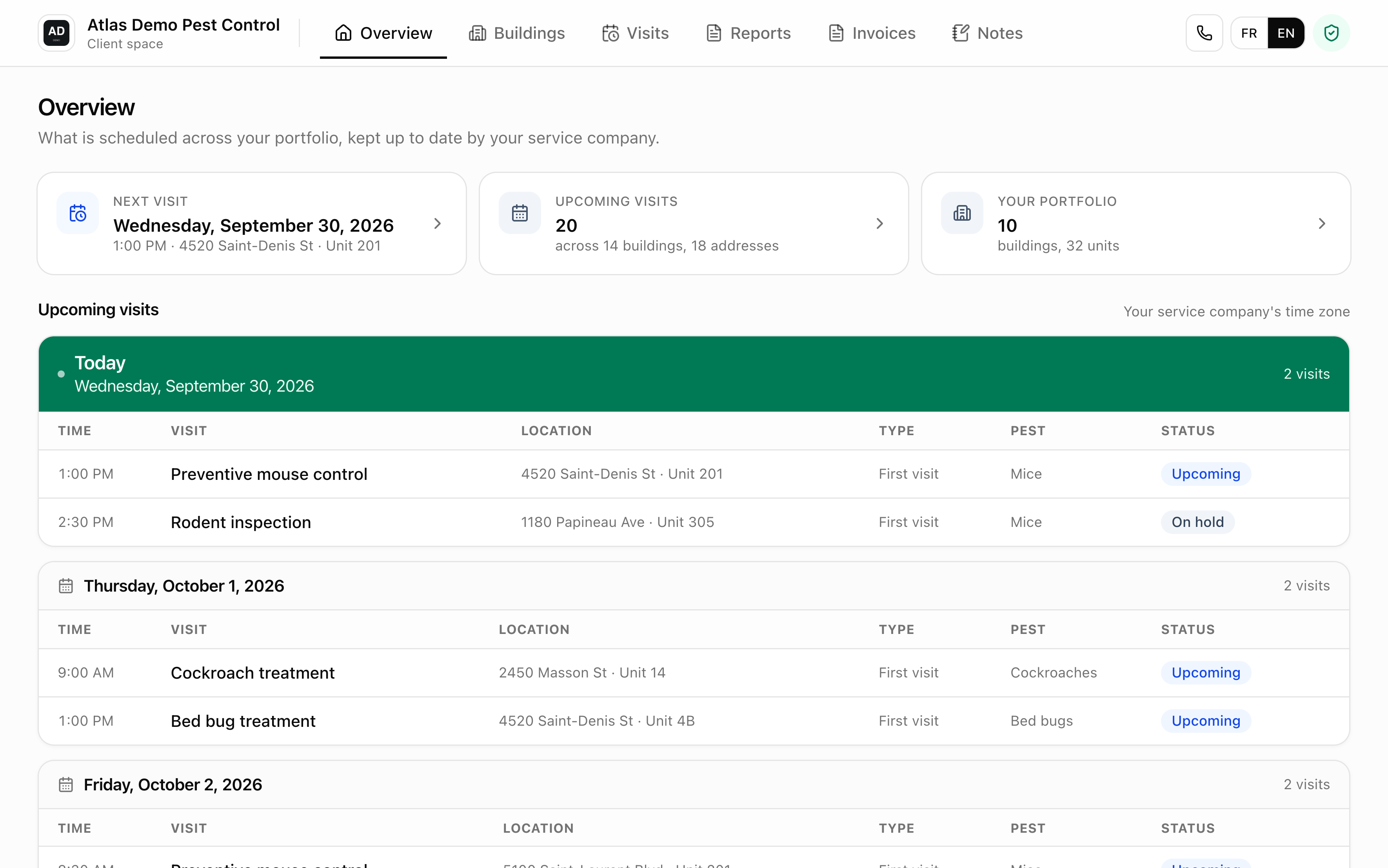
Atlas gives each customer a private read-only link to their portfolio, buildings, units and visits. No account to create, revocable at any time.
In short
A client portal is an interface where the customer checks the progress of their jobs themselves, without phoning or waiting for an email.
- Access
- Private link with a token, no account and no password
- Rights
- Read-only on your data. The customer only keeps their own notepad, which you do not read
- Content
- Their buildings, their units, the visits concerning them and the invoices sent
- Confidentiality
- Notes flagged private never appear there
- Revocation
- The link can be disabled and becomes invalid
In Atlas that portal is read-only, opens from a private link with no account to create, and shows only that customer's portfolio, building by building and unit by unit. It also shows the invoices you have sent them. The customer cannot change any of your data, never sees your private notes and cannot reach any other customer. The only thing they can write there is their own notepad, which you never read.
What exactly does a property manager see in the portal?
They see their portfolio, and only theirs. Their buildings, their units, and the visits concerning them, continuously up to date.
The left column lists their buildings, which they open down to the units, with the same tree used internally. For each unit they find the visits that concern it. That answers the three questions every customer asks: did someone come, where, and where do we stand. Because the information stays current, they no longer have a reason to call and ask for it, which is the real gain for a field crew.
Why a link instead of an account to create?
Because an account that has to be created never gets created. The private link opens on the first click, with no password to remember or reset.
Someone invited to sign up for software they did not choose puts it off, and you keep answering the phone. A private link removes that friction: it opens on the first click, on a phone or a computer, with no password to remember or reset six months later. The link carries a token that opens only that customer's portfolio, and you can disable it whenever you want, at which point it becomes invalid.
What does the customer never see?
Your private notes, other customers, and your internal organization. That is exactly what makes sharing possible at all.
What they see
- Their buildings and their units
- Upcoming visits and completed ones
- The notes you did not flag private
What they never see
- Your notes flagged private
- Other customers and their buildings
- Dispatch between your technicians
- Your company settings
That separation is what makes sharing possible at all. An unsanitary unit or a tenant refusing to prepare can be documented plainly, without the customer reading it. And because the link opens a single portfolio, two property managers never cross paths.
What does it change in the relationship with a customer?
A manager who has the link opens their portfolio and the checking call never happens. You stop selling transparency and simply hand it over.
It moves the conversation. A manager who doubts the contract is being honored calls, complains, and you spend thirty minutes reconstructing what was done. A manager who has the link opens their portfolio, sees the visits, and the call never happens.
In a tender it is also a concrete argument against competitors who promise follow-up without showing how. You stop selling transparency and simply hand it over, at the cost of sending a link.
What the portal does not do
- The customer cannot request a job or change anything, it is strictly read-only
- No online payment. The customer reads and saves their invoices as PDF, and never sees a draft
- The portal sends no notification. Emails to the customer come from your notice settings, when a visit is created, moved or canceled
Frequently asked questions
No. They open a private link, with no sign-up and no password. The link carries a token that grants access to their own portfolio only.
No. They consult their buildings, units and the visits concerning them, with no action available on your data. The only thing they can write is their own notepad, which the company never reads.
Yes, by email and under your name, if your customer notices are on and they have an email address. The portal does not send it, the schedule's notices do, when a visit is created, moved or canceled.
Yes. The link can be disabled and becomes invalid. That is useful at the end of a contract or when a contact changes on the customer side.
Only the ones not flagged private. A private note never appears in the portal, which lets you document a difficult situation plainly.
Send a portal to your biggest customer
Build their portfolio, share the link, and count the follow-up calls next month. No commitment.