 Atlas
Atlas Feature
The built-in mail inbox for pest control management software
Atlas connects your company mailbox and shows your clients' requests next to your schedule, recognizing who each email comes from. Gmail, Zoho and any IMAP mailbox.
In short
A built-in inbox means your work mailbox shown inside your job management software, instead of sitting in another tab.
- Supported providers
- Gmail, Google Workspace, Zoho, iCloud, Yahoo, OVHcloud, Infomaniak, Hostinger, IONOS and any IMAP mailbox
- Not supported
- Outlook, Hotmail and Microsoft 365, since Microsoft closed that access
- Setup
- One app password at your provider, about five minutes, once
- Install
- None, everything runs in the browser
- Security
- Password encrypted, key kept outside the database, access revocable from either side
- Attachments
- Received and sent, by button or drag and drop
- What you can do
- Read, reply, reply all, forward, search, mark as spam, star, drafts
- Link with Atlas
- A Client label when the address matches a record in your book, never on a guess
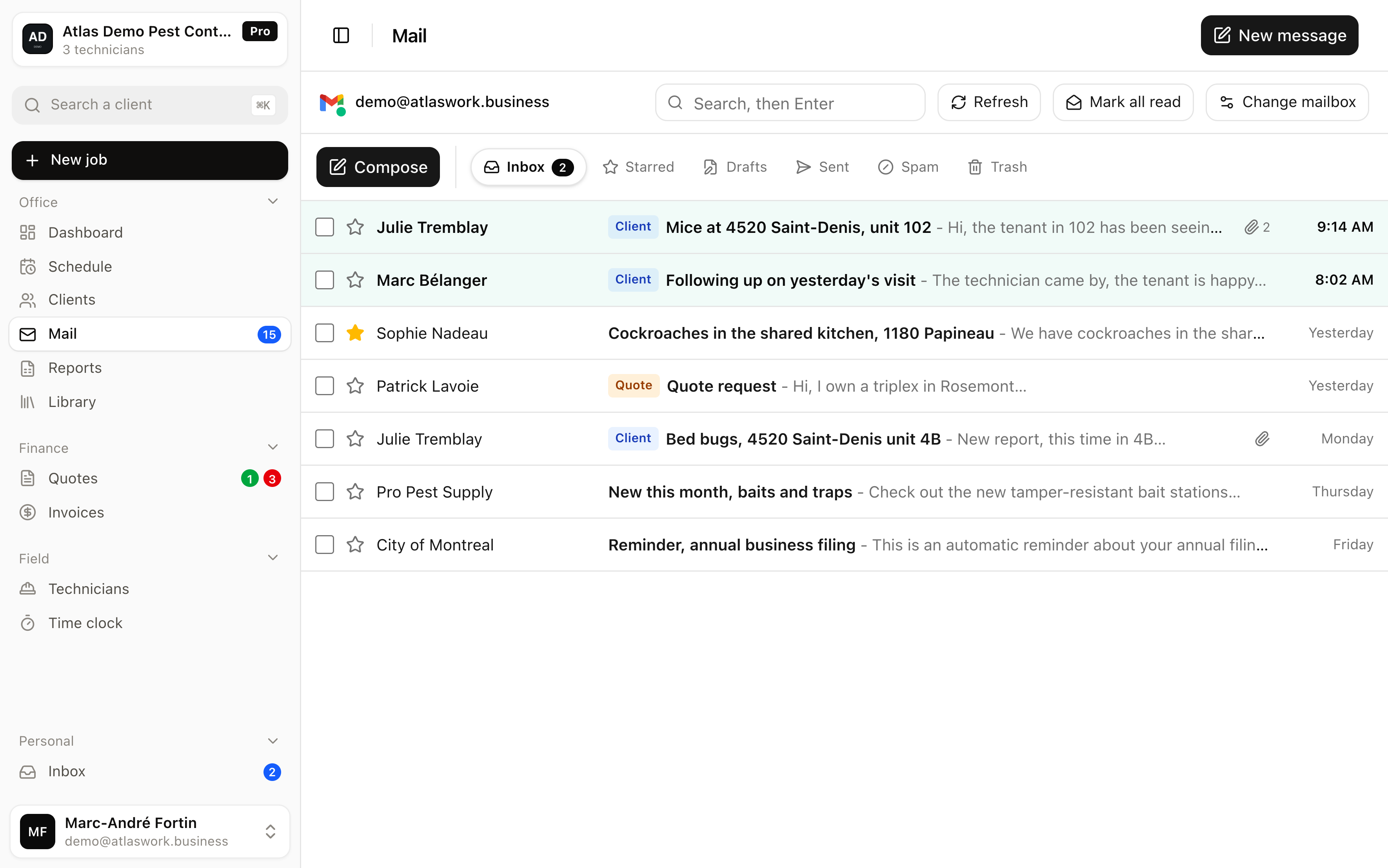
In Atlas you connect the mailbox you already use, with an app password, and you find it in the menu next to the schedule and the clients. You read, reply, forward, search and file as in any mail app. The difference is what Atlas adds around it, the sender is recognized as a client from your book and the email carries a label saying so, with nothing to look up. The password is encrypted and revocable at any time. Atlas does not create an address and does not replace your mail provider, it displays it where you work.
Why put the mailbox inside job management software?
Because the request almost always arrives by email, and handling it today means jumping between tools to find the address, the history and who is free.
In a pest control company, a job rarely starts with a form. It starts with a property manager writing that there are mice on the third floor, or a tenant replying to an earlier visit.
The dispatcher reads that email in one tab, opens the software in another, finds the client, finds the building, checks who is available, then goes back to reply. Every round trip costs a few dozen seconds and, more importantly, one chance to forget.
Showing the mailbox in the same screen removes those round trips. The message is there, the schedule is one click away, so is the unit's history. It is less spectacular than an automation, but it saves the most time over a real day, because it applies to every request rather than only the ones someone anticipated.
Which mailboxes can be connected to Atlas?
Gmail and Google Workspace, Zoho, iCloud, Yahoo, plus domain mailboxes at OVHcloud, Infomaniak, Hostinger or IONOS. Any other IMAP mailbox connects by entering its servers.
You pick your provider from a list, and Atlas fills in the technical settings for you, the servers and the ports, then shows the exact steps to follow at that specific provider. Only two fields are left, your address and the password. Here is the full list, with what each one needs.
- Gmail, personal account
- For an address ending in @gmail.com. An app password, created in your Google account security. 2-Step Verification must be on, otherwise the option appears nowhere.
- Google Workspace
- For a business address managed by Google. Same path, with one caveat, the company administrator may have turned off app passwords for everyone. Only they can re-open it.
- Zoho Mail, business address
- For an address tied to your domain name. You first turn on IMAP access in the mail settings, then create an application-specific password. These accounts use the imappro and smtppro servers, different from free accounts.
- Zoho Mail, free account
- For an address ending in @zohomail.com. Same path, turn on IMAP access then create an application-specific password, but with the standard imap and smtp servers.
- iCloud Mail
- An app-specific password, created from your Apple Account, under Sign-In and Security. Works for me.com and icloud.com addresses.
- Yahoo Mail
- An app password, generated from your account security. Covers yahoo.com and yahoo.ca addresses.
- OVHcloud
- Nothing special to do. Your full address is the username and the password is your usual webmail one.
- Infomaniak
- The mailbox's usual password is enough. If two-factor authentication is on for the account, create an application password from your dashboard instead.
- Hostinger
- The mailbox's usual password, the one you use in webmail. Resettable from hPanel if you forgot it.
- IONOS
- The mailbox's usual password, changeable from your control panel. North American servers are preconfigured, accounts opened in France use .fr servers.
- Any other IMAP mailbox
- Your internet provider or your host. You enter the incoming server, the outgoing server and their ports yourself, and we help you find them if needed.
- Microsoft, not possible
- Outlook, Hotmail and Microsoft 365 still appear in the list but grayed out, with the explanation. See the next question.
How does Atlas walk you through connecting, step by step?
As soon as you pick your provider, the screen shows the numbered steps specific to it, with a link to its official help, and the technical settings are already filled in.
This is where most mailbox integrations fail elsewhere. Someone is asked for an IMAP server, a port and an app password, with no hint where to find them, and they give up. Atlas takes the problem the other way around. You only see your own case, not a generic manual, and the technical terms stay hidden until you actually need them.
- Pick your mail providerGmail, Google Workspace, Zoho, iCloud, Yahoo, OVHcloud, Infomaniak, Hostinger, IONOS, or any other IMAP mailbox. Atlas then fills in the servers and ports for you.
- Create an app password at your providerTheir numbered steps appear on screen, with a link to their official page. Count two to three minutes.
- Enter your address and that passwordTwo fields, nothing else. Your usual password is never asked for, and this one stays revocable at your provider.
- Click test the connectionAtlas actually opens receiving then sending before storing anything. If it fails, nothing is kept and the error is explained in plain language.
- Your provider's steps
- Six numbered steps for Gmail, eight for Zoho, six or seven at a host. Written in the exact wording of their screens, not ours.
- A link to the official help
- A direct link to the provider's own page, for those who prefer to check at the source.
- Servers already filled in
- You only fill two fields. The technical settings are preconfigured and stay editable in a collapsed panel, for edge cases.
- Pitfalls flagged upfront
- A callout warns about what will trip you up, a European Zoho account, a Google administrator who blocked the option, a Microsoft mailbox that cannot work.
- A test before saving
- Atlas actually opens receiving then sending with your credentials. Nothing is stored if the connection fails.
- Errors in plain language
- No technical codes. You read that the password was refused, that the server was not found or that IMAP is off, along with what to do about it.
What can you do once the mailbox is connected?
Everything you expect from a mail app, read, reply, forward, search, file, plus what an ordinary mail app cannot know, who this client is and which jobs they have already had.
The screen looks like a normal mail app and needs no explanation. The back and forth of one exchange is grouped into a single thread, your own replies included, so you do not read the same subject ten times. HTML emails show with their layout, cleaned of anything that could track your reading, and remote images stay blocked until you ask for them.
- Read and reply
- Reply, reply all, forward. The reply goes out from your address and attaches to the thread on your correspondent's side, it does not open a separate conversation.
- Search
- The search runs on the mail server, not only on the emails already displayed. From the inbox it covers the inbox and sent items together, from the bin or the spam folder it stays on the folder you are in.
- File
- Mark as spam, star, delete. Several at once by ticking the boxes.
- Drafts
- What you write is kept half a second after your last keystroke and comes back untouched if you close the window.
- Signature
- Atlas finds the signature from your past emails and offers it in your replies. It deletes like any other text.
- Attachments
- The ones you receive open in one click with their name and size. The ones you send are added with a button or by dropping them into the reply area.
What does this inbox do that Gmail cannot?
It knows who is writing to you. When the address matches a record in your book, the email carries a Client label, so you know who you are dealing with before you even open it.
An ordinary mail app does not know your clients. It shows an address, and it is up to you to remember whether that is a property manager, a supplier or a stranger. Atlas compares the address to your book and says so, at a glance, in the list as well as in the open message. On a mailbox taking fifty emails a day, that is what separates a client request from a newsletter.
- Client label
- Only shown when the address matches a record exactly, or when the domain belongs to the company itself. Never on a gmail.com, which two unrelated people can share.
- Invoice and Quote labels
- Based on the subject line only, where the wording is explicit. Nothing is guessed from the body of the message.
- Nothing when nothing is certain
- Unknown address, no block shown. A wrong label would be worse than no label.
Does Atlas suit a pest control company in Canada and in France?
Yes for both, with one thing to know. The interface, the help and the support are bilingual, both markets' mail providers are preconfigured, but the subscription is billed in US dollars.
The trade goes by different names on each side of the Atlantic. In Quebec people say pest management and extermination, in France lutte antiparasitaire and 3D, for rodent control, insect control and disinfection. The software does the same thing either way, because the work is the same. A report comes in by email, you have to find the address, the unit's history, send a technician and keep a record.
- In Canada and Quebec
- Gmail, Google Workspace and internet provider addresses such as Vidéotron or Bell connect over IMAP. Dates, times and addresses follow Canadian conventions.
- In France
- OVHcloud, Infomaniak, IONOS and Zoho business mailboxes are preconfigured, the ones small French companies most often use. An address tied to your own domain connects like any other.
- Two languages, one product
- Each person on the team picks French or English, with no separate account and no separate data. Useful for a company working in both.
- What to know before you commit
- The subscription is billed in US dollars, and the publisher is established outside the European Union. If your market requires European hosting, tell us before you sign up.
Can an Outlook or Microsoft 365 mailbox be connected?
No, and that is not a choice Atlas made. Microsoft removed password-based connections on personal mailboxes in September 2024, then on sending in April 2026. App passwords no longer exist there.
The only possible route for a Microsoft mailbox is their official sign-in button, which requires an annual verification on their side. We are preparing it. In the meantime Microsoft appears in the list but grayed out, with the explanation, rather than letting you try and fail. If your mailbox is with them, write to us, it helps us know how many companies are affected.
Where does the mailbox password go, and who can read it?
It is encrypted before being stored, with a key that is not in the database. Nobody can read it back, neither from the application nor from the database.
The password travels to our server, which first checks that the connection actually works, then encrypts it and stores it in that form. The decryption key lives in the server configuration, separate from the database. A stolen copy of the database therefore contains unreadable data only. The application never reads that column, it goes through a view that does not contain it.
You stay in control
- Disconnecting the mailbox from Atlas erases the secret
- Revoking the app password at your provider cuts access immediately
- The code only grants access to mail, not to the rest of your account
What Atlas does not do
- It does not know your usual password
- It does not touch any mailbox other than the one you connect
- It keeps nothing after you disconnect
Can you reply and attach files from Atlas?
Yes. The reply goes out from your own address, and files are added with a button or by dropping them straight into the reply area.
It is a common move in this trade. A manager sends a photo of the damage, you reply with confirmation of the visit or a document. Attachments you receive appear under the message with their name and size. For the reply you can drag several files at once, remove them one by one, and the recipient gets an email coming from your usual address, not from an automated one.
What the mail inbox does not do
- Atlas does not create an email address and does not host your mail, it displays the mailbox you already have.
- Microsoft mailboxes cannot be connected, since Microsoft closed that access.
- One mailbox per account, no shared inbox with per-person rules.
- Drafts are kept in the browser where you write them, not at your provider. A draft started at the office will not be on your phone.
- No job can be created from an email, and no client history is shown inside the message. The inbox recognizes the client, it does not act for you.
- No archiving. On Gmail, archiving means taking a message out of the inbox without it landing in any identifiable folder, which makes the action impossible to explain honestly. You delete, or you leave it.
- No filters, sorting rules or multiple signatures, this is not a replacement for your mail provider.
- New emails are fetched when you open the mailbox, on demand, and every thirty seconds while the tab is open. There is no push notification on your desktop or your phone.
Frequently asked questions
No. You connect the address your clients already know. Atlas creates no address and your emails keep arriving normally in your usual mailbox.
About five minutes, once. Most of that time goes into creating the app password at your provider, and Atlas shows the exact steps for yours.
No. Access is limited to the mailbox you connect, and it stops as soon as you disconnect it or revoke the app password at your provider.
Yes. OVHcloud, Infomaniak, Hostinger and IONOS mailboxes are preconfigured, and any other IMAP mailbox connects by entering your host's servers.
No. The mailbox is an office tool, and everything runs in the browser. Technicians keep their usual space, which only contains their jobs for the day.
It compares the sender's address to the records in your book. Exact match, or a domain that belongs to the company itself. A gmail.com address is never enough, since two unrelated people can have one. Without certainty, no label is shown.
No. They are read at your provider at the moment you display them, then forgotten. Atlas keeps neither your messages nor your attachments, only the connection settings and the encrypted password.
See the mail inbox in Atlas
The demo is open, with no account and no card. You can open the mailbox, the schedule and the client portal there.