 Atlas
Atlas Feature
Scheduling and dispatch for a pest control company
Atlas groups jobs day by day, reorganizes by drag and drop and generates recurring visits. Built for pest control and extermination businesses.
In short
Scheduling and dispatch software exists to lay out the week's jobs, split them between technicians and reorganize them when the day changes.
- Who it is for
- Pest control and extermination businesses
- Main view
- A list grouped day by day, today first, day changes by drag and drop
- Recurring visits
- Generated automatically from a frequency set once
- In the field
- The day's route, jobs ticked on site, works on a weak connection
- Price
- Included in the Pro plan, the monthly price of your country, 1 technician included, then €9.99, CA$14.99, US$10.99 or AED 39 per additional technician, no commitment
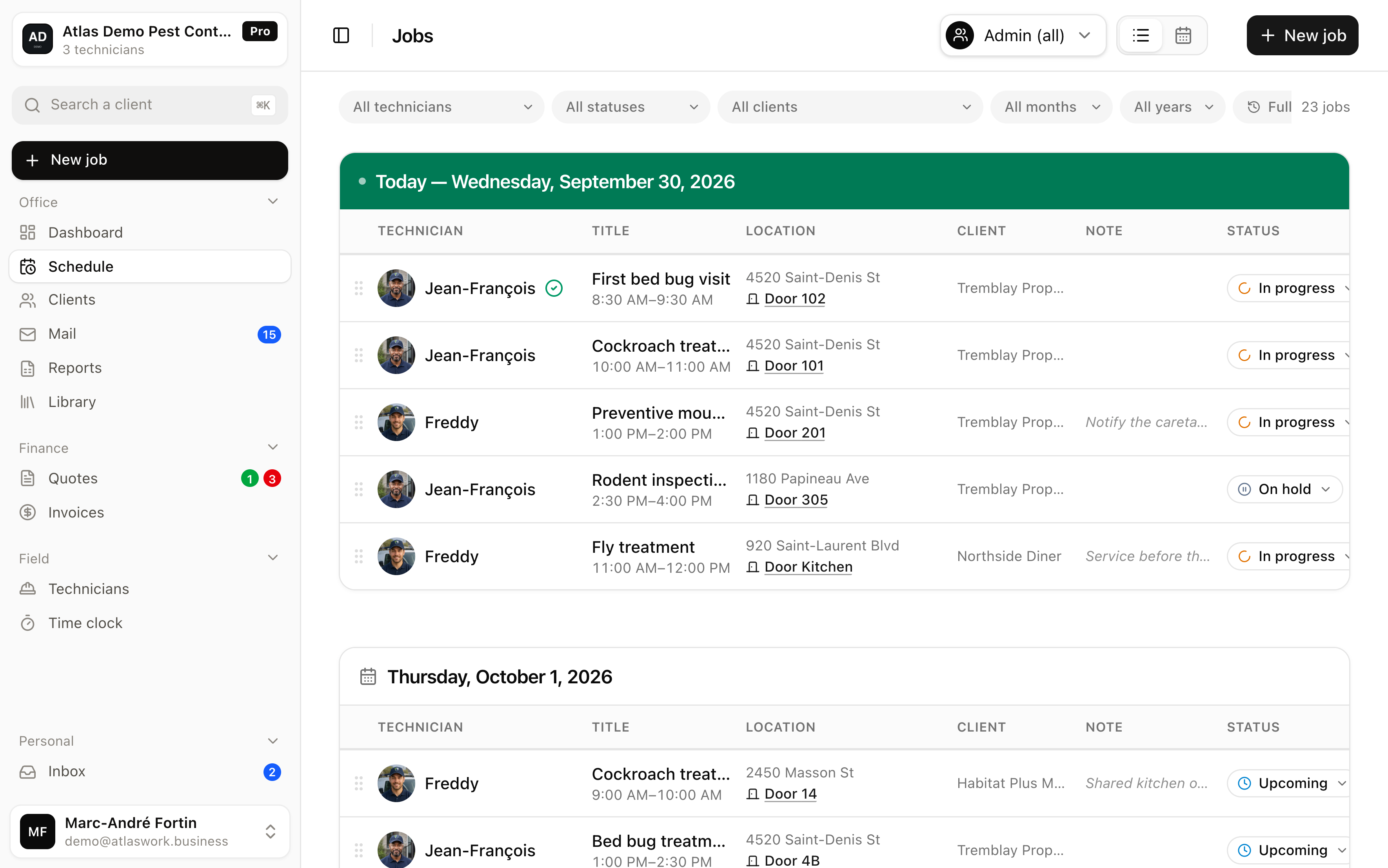
In Atlas jobs are read day by day, each row carrying its technician, its location and its status, and a job is dragged from one day to another. The technician sees the change on their route with no phone call needed. Atlas organizes and tracks field work, and invoices it since August 2026; it keeps no books and takes no card payments.
Why does a pest control day never survive the morning plan?
Because an emergency jumps the queue, a building refuses access and a treatment runs long. The real cost is not fixing the plan, it is the missed visit you discover two weeks later.
Because an emergency nest jumps the queue, a building refuses access, and a treatment runs an hour long. When dispatch lives in a spreadsheet or a group chat, every change costs three phone calls and leaves someone in the dark.
The real cost is not the time spent fixing the file, it is the missed visit you discover two weeks later, when the customer calls back. Scheduling software fixes exactly that: it keeps a single version of the day, readable by the office and the field at the same time.
How is work split between technicians?
The technician is picked on the job itself. The list reads day by day, filters by technician, and a job moves from one day to another by drag and drop.
The technician is assigned on the job, from a dropdown on its record. The office then reads the week day by day, today first, each row carrying its technician, time, location, customer, note and status. A technician filter narrows the day down to one person when you want to see what they have ahead of them.
When an emergency lands, you grab the handle on the left of the row and drop the job on another day: its time and duration follow, and an undo button stays on screen long enough to change your mind. Two details change the daily reality.
- Jobs with no fixed time
- can be placed on the full day, alongside jobs with a set slot, because a field crew does not run everything to the quarter hour.
- The statutory holidays
- of the country set on your account are known to Atlas, including on visits generated months in advance.
What does the technician see, and when?
They find the day's route in order and tick each job on site. Atlas records who ticked it and at what time.
Each technician opens their workspace and finds the day's route, in order. They tick each job on site, and Atlas records who ticked it and at what time. That proof of execution is visible to the office and stays separate from the administrative status of the file, which you keep under your control, so a field action never closes a job too early.
The workspace works on a weak connection, which counts in basements and underground parking. The evening before, an email reminder goes out to the technicians confirmed on the next day's jobs.
What happens when a visit could not be completed?
A reason is required, so the visit does not vanish from the week. It stays visible and reschedulable, with the reason on record.
A reason is required: locked door, tenant refusal, no access, or another situation. The visit therefore does not vanish from the week, it stays visible and can be rescheduled. Within a few weeks those reasons map out the addresses that quietly cost you money, and you can raise them with the property manager using facts instead of an impression. That is the part of dispatch that pays off long after the day itself.
What Atlas does not do
- No optimized routing and no GPS routes, dispatch stays your decision
- Drag and drop changes a job's day, never its technician, which is edited on the job record
- No automatic workload calculation per technician
- No bookkeeping and no export to accounting software
Frequently asked questions
Atlas publishes no maximum team size, and the subscription follows the number of technicians you add. Scheduling, dispatch and the technician app are all included in the Pro plan, which is the monthly price of your country, one technician included, then €9.99, CA$14.99, US$10.99 or AED 39 depending on the country per additional technician, with no commitment, so cost follows the real size of the crew.
No. Dragging a job places it on another day, keeping its time, its duration and its technician. To hand the visit to someone else, you open the job record and change the technician in the dropdown.
Yes. Atlas knows the statutory holidays of the country set on your account and takes them into account, including on recurring jobs generated months in advance.
Yes, on the full day. It sits in the plan alongside jobs with a set slot, which avoids inventing precision that does not exist.
No. Atlas does not compute optimized routes or GPS routing. In pest control the order of a route often depends on access or on a tenant, not only on distance.
Put your real week into Atlas
Enter your jobs and judge it on your own schedule, not on a demo. No commitment.