 Atlas
Atlas Feature
Visit history, address by address and unit by unit
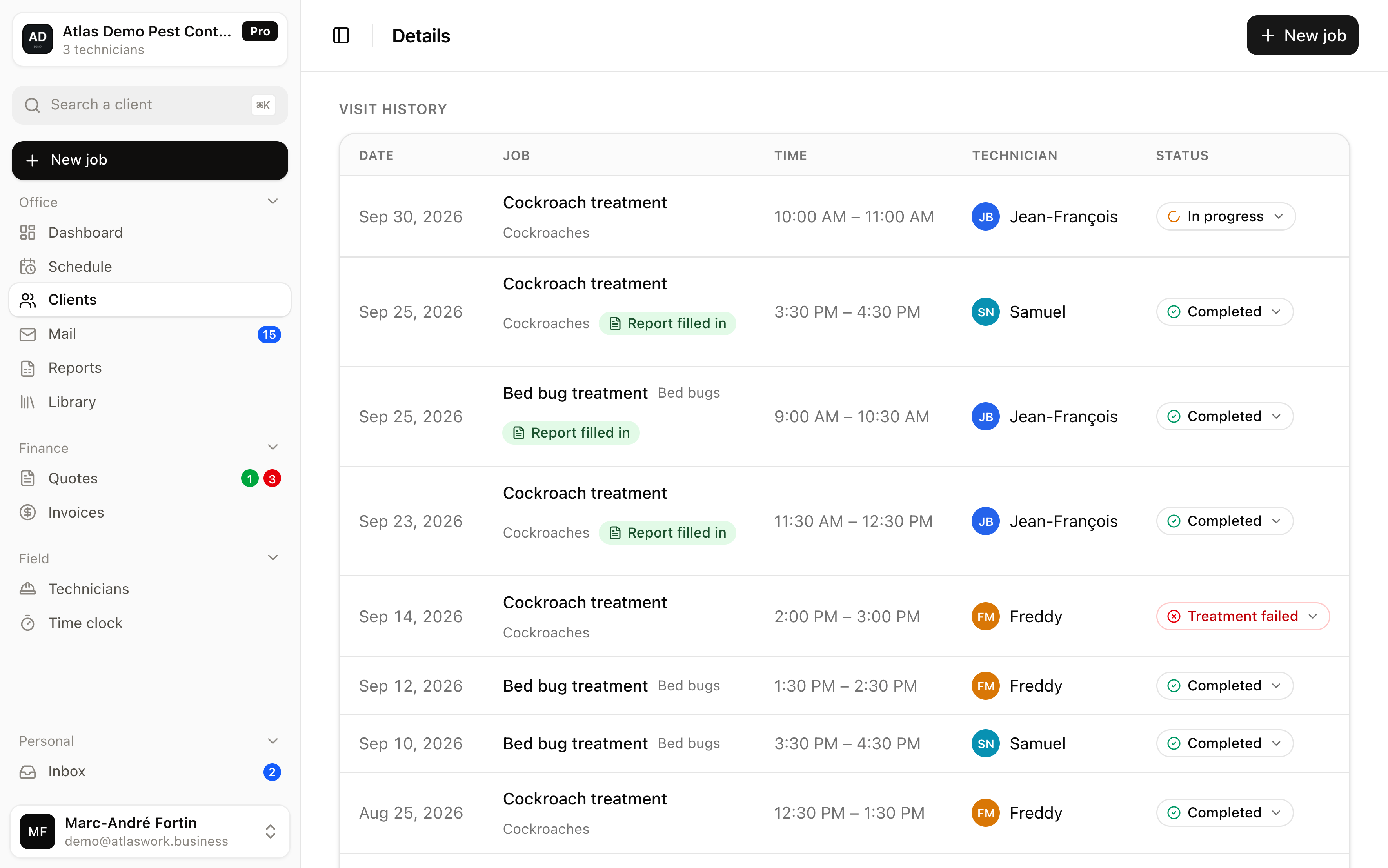
Atlas keeps the sequence of visits for every unit, with visit type, pests, technician, timestamp and the reason when a visit fails. Useful in audits and disputes.
In short
The history of an address is the sequence of visits carried out there, each one recording what was treated, by whom and when.
- Level of detail
- By building and by unit, not only by street
- What a visit holds
- Visit type, pests targeted, technician, status, notes
- Proof
- Technician name and exact time of the on-site confirmation
- Failed visits
- Kept with their reason: locked door, refusal or no access
- Confidentiality
- A note flagged private never appears on the customer side
Atlas keeps that history down to the unit, with the visit type, the pests targeted, the technician, the timestamp of the on-site confirmation, the reason when a visit fails, and the field notes. Photos and the document handed to the customer go through the visit's service report.
What exactly does a visit hold in the history?
The visit type, the pests targeted, the customer, building and unit, the date, the technician, the status and the notes. Plus the name and time of the on-site confirmation.
None of that is retyped at the office, which is the only way to end up with a genuinely complete history rather than a history of the days somebody found time to fill it in.
- The visit
- its type and the pest or pests targeted, because one trip often covers several at once, rodents and cockroaches on the same contract.
- The place
- the customer, the building and the unit concerned, down to the door.
- The execution
- the date, the assigned technician, the status, plus the name and exact time of the on-site confirmation.
- The context
- a notes area, some of which can stay private and never reach the customer.
Why go down to the unit instead of staying at the address?
Because the questions you get asked are about a door, not a building. Unit-level tracking also reveals the patterns an address hides.
When a property manager reports bed bugs returning on the fourth floor six months after a treatment, the useful answer is the list of visits for that specific unit, not the hundred and twenty jobs done in the building.
Unit-level tracking also reveals the patterns an address hides: one door that comes back three times while the rest of the building stays clean, or a whole wing reinfesting from the same point. That level of detail is what lets you treat the cause instead of returning forever.
How do you record a delicate situation without the customer reading it?
A note can be flagged private, and it then never appears in the client portal. Your technicians can write down what they actually see.
A field note is often blunt: an unsanitary unit, a tenant who refuses to prepare, clutter that explains why the treatment is not holding. That note is essential to the crew and disastrous if the customer reads it.
In Atlas a note can be flagged private, and it then never appears in the client portal. You keep two levels of truth in one place, without a parallel notebook that eventually gets lost. That is what lets your technicians write down what they actually see.
What is the history worth in an audit or a dispute?
To show rather than claim. The history carries the technician's name, the time of their confirmation, and failed visits with their reasons.
It lets you show rather than claim. In food processing and restaurants, hygiene programs require presenting the sequence of inspections on a site, date by date. In a dispute with a customer the stake is the same, proving the visits happened and under what conditions.
The Atlas history carries the technician's name and the time of their on-site confirmation, along with failed visits and their reasons. That last point often settles the discussion: a treatment that could never be completed because three doors stayed locked explains a reinfestation better than a long argument.
What Atlas does not do
- No generated history document and no printable certificate
- No free file attachments on a visit, photos go through the service report
- No official regulatory register, the history stays an internal tracking tool
Frequently asked questions
Visits stay attached to their unit for as long as the customer exists in your account, and nothing is deleted. The screen itself loads the last eighteen months, which covers your longest warranty and the previous seasons. Beyond that the history is still in the database and exports out.
Yes, with its required reason: locked door, tenant refusal or no access. That is exactly what lets you explain later why a building was never fully treated.
Yes. You read the history at building level for the overview, then drill into a unit to see only what happened there.
No history document or certificate. History is consulted in the tool, and the customer can see part of it in the read-only portal, without the notes flagged private. Each visit can, however, produce a service report as a PDF sent to the customer.
Try it on an address you know by heart
Enter a building, its units and two visits, and see how it reads back. No commitment.