 Atlas
Atlas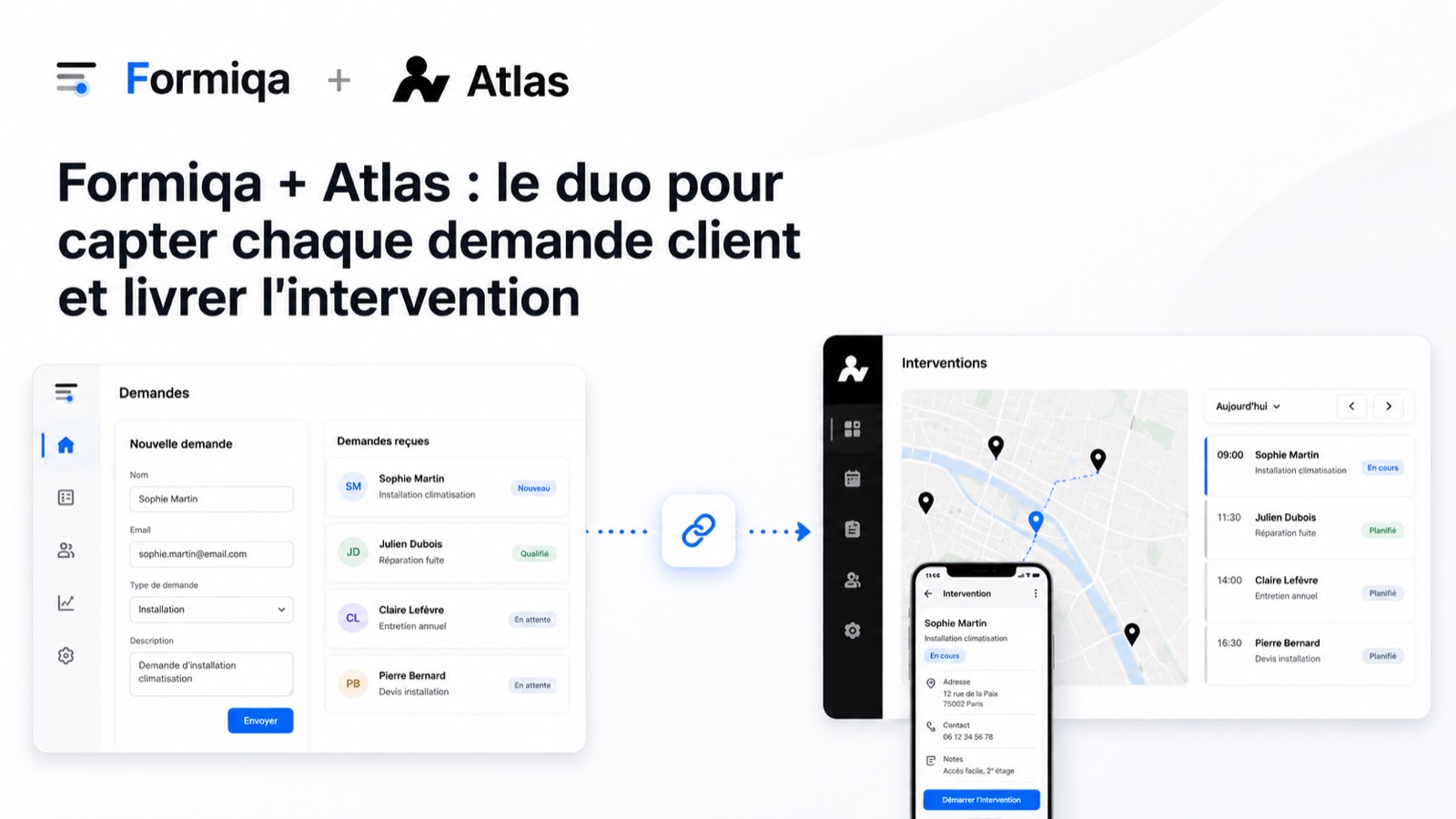
For a small service business, an exterminator, a pest control company, a plumber or a roofer, client requests rarely fall through for lack of will. They fall through the cracks between tools, a buried email, a poorly noted call, a quote never followed up. A good system doesn't make the owner more disciplined, it makes sure no request can slip between two chairs.
Where client requests really get lost
The request gets lost between first contact and the job, in the gray zone where no tool clearly owns it. The client sends a vague email, calls while the technician is on a site, or leaves a voicemail that's never transcribed. The information arrives with no structure, no full address, no photo of the problem, no availability.
The result, response time stretches out, the client goes to the competitor who called back first, and the company has no record of what it missed. The problem isn't the workload, it's the lack of a single, structured path between “the client wants something” and “a technician is on it”.
How Formiqa captures the client request
Formiqa captures the request with a structured online form the client fills in under two minutes, with no account to create. Each published form gets a unique web address you share by email, on your site, or in a signature.
In practice, for a service business, here is what that looks like.
- More than 15 field types, text, email, file upload, date, rating, multiple choice and conditional logic, enough to build a real quote request form, not just a “message” field.
- File upload included, the client attaches a photo of the infestation, the building plan or a contract. Files are encrypted at rest, 1 GB on the free plan and 10 GB on the Pro plan.
- Real-time email notifications and one-click CSV export, every request lands in your inbox right away and shows up in a central table you can search and filter.
- No per-response fees, unlike Typeform, which charges between $0.01 and $0.05 per response above the quota, the Formiqa bill stays flat no matter how many requests you receive.
- A real free plan, 5 forms, 10 submissions per form per month, 1 GB of storage, no credit card and no expiry date.
Formiqa also provides about twenty ready-to-use templates, including Client Intake, Customer Feedback and Contact Form, that you customize and publish with no design work.
How Atlas turns the request into a job
Atlas takes the captured request and turns it into a scheduled job, assigned to a technician. Where Formiqa handles the public front door, Atlas handles everything that happens next, internally.
Atlas is a pest control and field service software built for small teams, usually 3 to 15 technicians. It covers several areas.
- scheduling and dispatching technicians in the field;
- managing jobs and tracking their status;
- the full history of every unit, address by address;
- a view-only client portal for property managers;
- vocabulary built for Canadian pest control, like exterminator, pest control or cockroaches, rather than words awkwardly translated from an American tool.
In other words, Formiqa tells you a client has a problem, and Atlas makes sure the right technician shows up at the right address, at the right time, with the right quote.
What the full client loop looks like
The full loop runs from request to loyalty, in six steps where each tool does exactly one thing. Here is the path of a typical pest control request.
- Capture (Formiqa), the client fills in the quote request form, with the address, pest type, photo and availability. No account to create, no friction.
- Intake (Formiqa), the request triggers an email notification and lands in the central table, exportable as CSV.
- Scheduling (Atlas), the request becomes a job, Atlas assigns it to a technician and places it on the schedule.
- Job (Atlas), the technician performs the service, and the status and details are tracked in real time.
- Feedback (Formiqa), after the service, a Customer Feedback form measures satisfaction and collects reviews.
- Loyalty, recurring requests come back through the same form, and the history stays centralized.
The handoff between the two tools runs on Formiqa's standard mechanisms, email notification and CSV export, without relying on a proprietary integration.
Why separate capture and execution
Because capturing a request and executing a job are two different kinds of problems, and a single tool trying to do everything ends up doing both poorly. A capture form has to be public, light and account-free, so any client fills it in two minutes. A dispatch software has to be private and structured, so the team works reliably.
Merging the two means either forcing an account on the client, with friction and drop-offs, or exposing your operations engine to the public, with risk and complexity. The duo keeps each tool in its role, Formiqa optimizes conversion at the entry, Atlas optimizes execution internally. Each one can be replaced or evolve independently.
Why a detailed job report is essential in pest control
Because in pest control, the client, and often the regulation, requires a written record of what was done on site. A detailed job report documents three things, the state of the unit at the time of the visit (areas inspected, infestation level, entry points found), the products applied (name, dose, treated areas) and the instructions to follow after the visit (re-entry delay, ventilation, precautions for children and pets).
This document plays several roles at once.
- Proof of visit, the client, property manager or absent owner has written confirmation the job took place, with date, time and the technician named.
- Record of product application, applying pesticides is a regulated, licensed activity, and logging the products used protects both the exterminator and the client.
- Enforceable safety instructions, if the client has to leave the premises for a few hours or keep pets away, the written instruction stands, a verbal reminder is not enough.
- Case history, on follow-up visits, the technician sees the unit's prior state and the products already applied, which avoids redundant treatments.
This is where the duo's split of roles becomes concrete. Formiqa captures what the client describes about their problem (photos, symptoms, address), and Atlas documents what the technician found and applied on site. Atlas's job report closes the loop with a professional document handed to the client, something neither an email nor a public form can replace.
How much does the duo cost
Pricing transparency is exactly one of the reasons for the duo. Formiqa offers a permanent free plan (5 forms, 1 GB) and a Pro plan at $26.90 per month, with no per-response fees, 10 GB of storage and CSV export. Atlas runs on a monthly, commitment-free plan, and the pricing details are on the Atlas pricing page.
No hidden per-response fees, no long-term commitment, the bill stays predictable, which matters when you run a small team.