 Atlas
Atlas
A pest control company in Quebec does not operate like a service company anywhere else in North America. The housing stock is made of plexes and multi-unit buildings, the people paying the bills are often property managers who want visibility, and technicians spend the day driving between neighbourhoods. The right software here is not necessarily the one that dominates elsewhere.
What makes the Quebec market different?
Three realities come up in every company here. Density first, where a single address hides ten doors and tracking has to go down to the unit, not just the building. The seasons next, with rodents moving indoors as soon as it turns cold and bed bugs that never take a break. And language last, because a Quebec technician works in French, and a tool that only exists in English creates friction every single day.
How much does pest control software cost in Quebec?
Atlas costs the monthly price of your country, shown on the Pricing page, one technician included, then €9.99, CA$14.99, US$10.99 or AED 39 depending on the country per additional technician. This is what usually decides it. No commitment, cancel anytime. Prices are shown in US dollars, so factor in the exchange rate.
In practice, in Canada, a crew of 3 technicians comes to CA$89.97 per month. A crew of 6, CA$134.94. A crew of 15, CA$269.85. Cost follows the real size of the company, with no harsh tier jump and no half-empty plan you pay for anyway.
The gap is not only about the amount. Of the six tools compared in our study, three do not publish their pricing, Organilog, Praxedo and Plannit, and you have to go through a salesperson to learn the rate. GorillaDesk does not break its pricing down either. Jobber does show subscription tiers, and Atlas shows its price down to the technician. For a small Quebec company that wants to budget before committing, knowing the price up front changes everything.
Which software suits a company with 2 to 5 technicians?
Between 2 and 5 technicians, the real problem is not the software, it is whatever is standing in for it. A notebook, a whiteboard, a group text and the owner's memory. That holds while volume is low, then one visit slips through the cracks and a client calls angry.
Atlas replaces all of that with a plan laid out by day and by technician, where a job moves by drag and drop. A contract's recurring visits generate themselves from a frequency set once. And most importantly, a failed visit requires a reason, so it stays on the board to be rescheduled instead of vanishing. That one detail is what moves a crew from improvising to reliable, without hiring anyone at the office.
Which software suits a company past 10 technicians?
Past 10 technicians the problem flips. The company is no longer trying to do more, it is trying to stop losing. Losing hours on the phone reassuring property managers, losing a unit's history when a technician leaves, losing a warranty because nobody knows when the first visit happened.
Atlas works deep on those three points. History goes down to the unit and stays attached to the door, not to the technician. Warranties are calculated pest by pest from the first visit. And the client portal gives a property manager a read-only link to their own portfolio, with no account to create, which cuts a large share of follow-up calls outright. The company stops running and starts leaning on its system.
Who uses the software inside a pest control company?
Three people use the software, and they need different information at the same moment. The one who organizes, the one who does the work and the one who pays. Atlas gives them three separate interfaces wired to the same data, and that is where the real difference with a generalist tool shows. When the office moves a visit, the technician concerned sees it right away, and so does the property manager, with no call and no email.
What does the dispatcher see at the office?
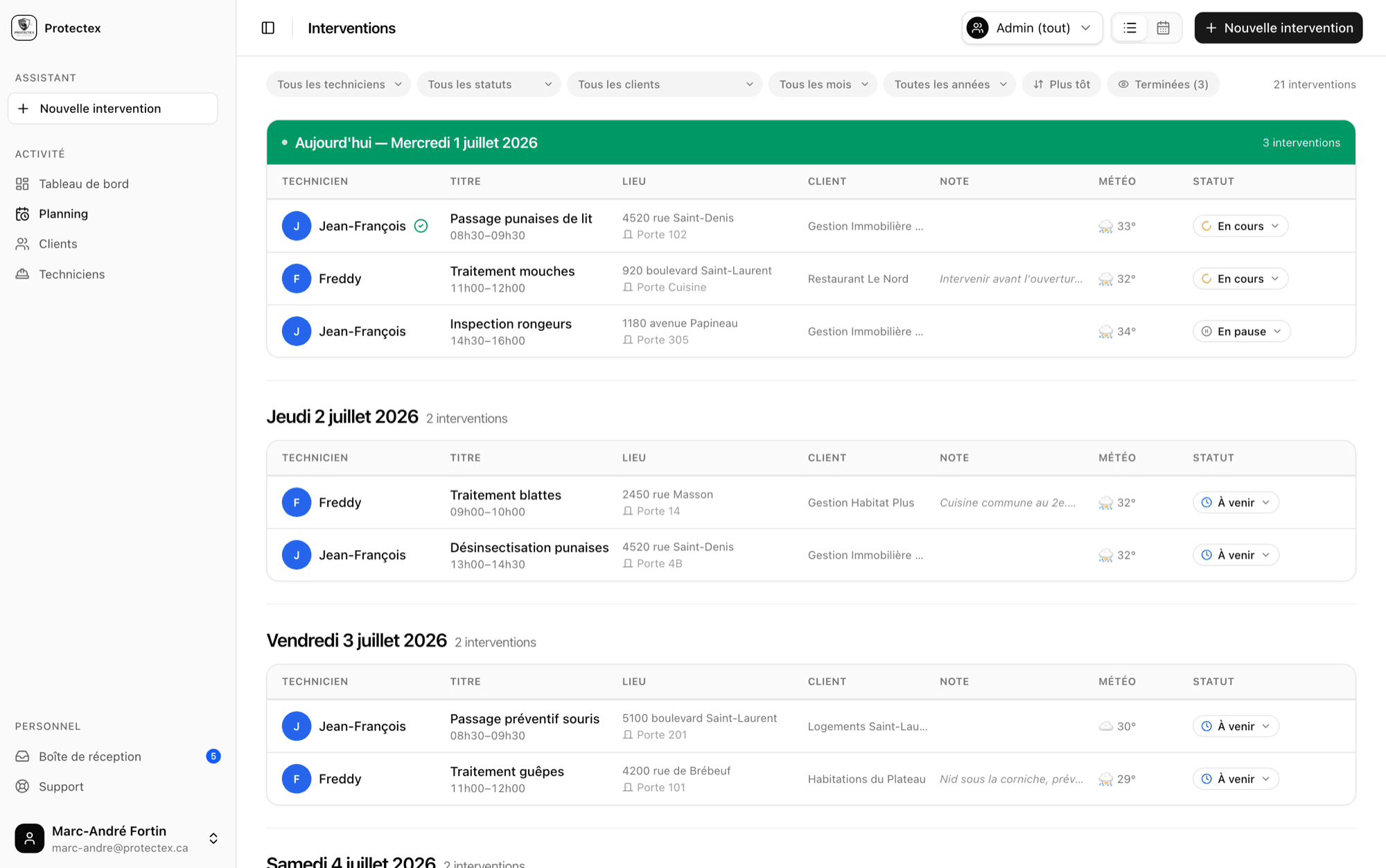
The dispatcher sees the cockpit. They lay out the week on a plan organized by day and by technician, moves a job by drag and drop and follows progress live, upcoming, in progress, done. A contract's recurring visits generate themselves from a frequency set once. A failed visit requires a reason, so it stays visible to be rescheduled instead of vanishing off the board. Clients, buildings, units and the crew are all managed from the same screen.
What does the technician see in the field?
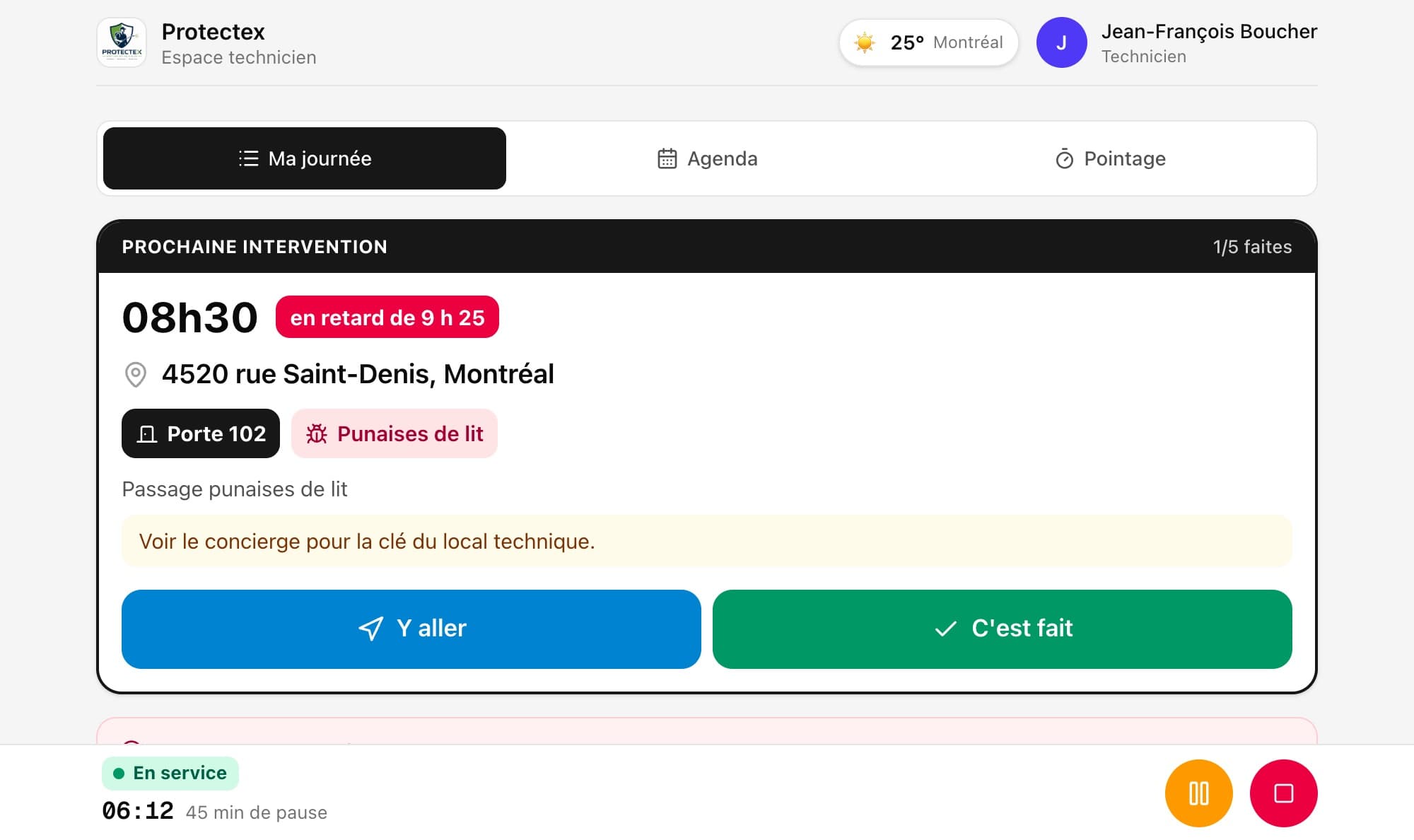
The technician opens a personal link on their phone, with no password and nothing to install. They see only their own jobs for the day, with the address, the time, the unit and the pest type, and they tick each visit on site, even on a weak signal in a basement. Atlas records who ticked it and at what time. They never have access to other technicians' jobs or to commercial data. No more paper route sheets, no more calling the office to find out where to go next.
What does the client see in their portal?
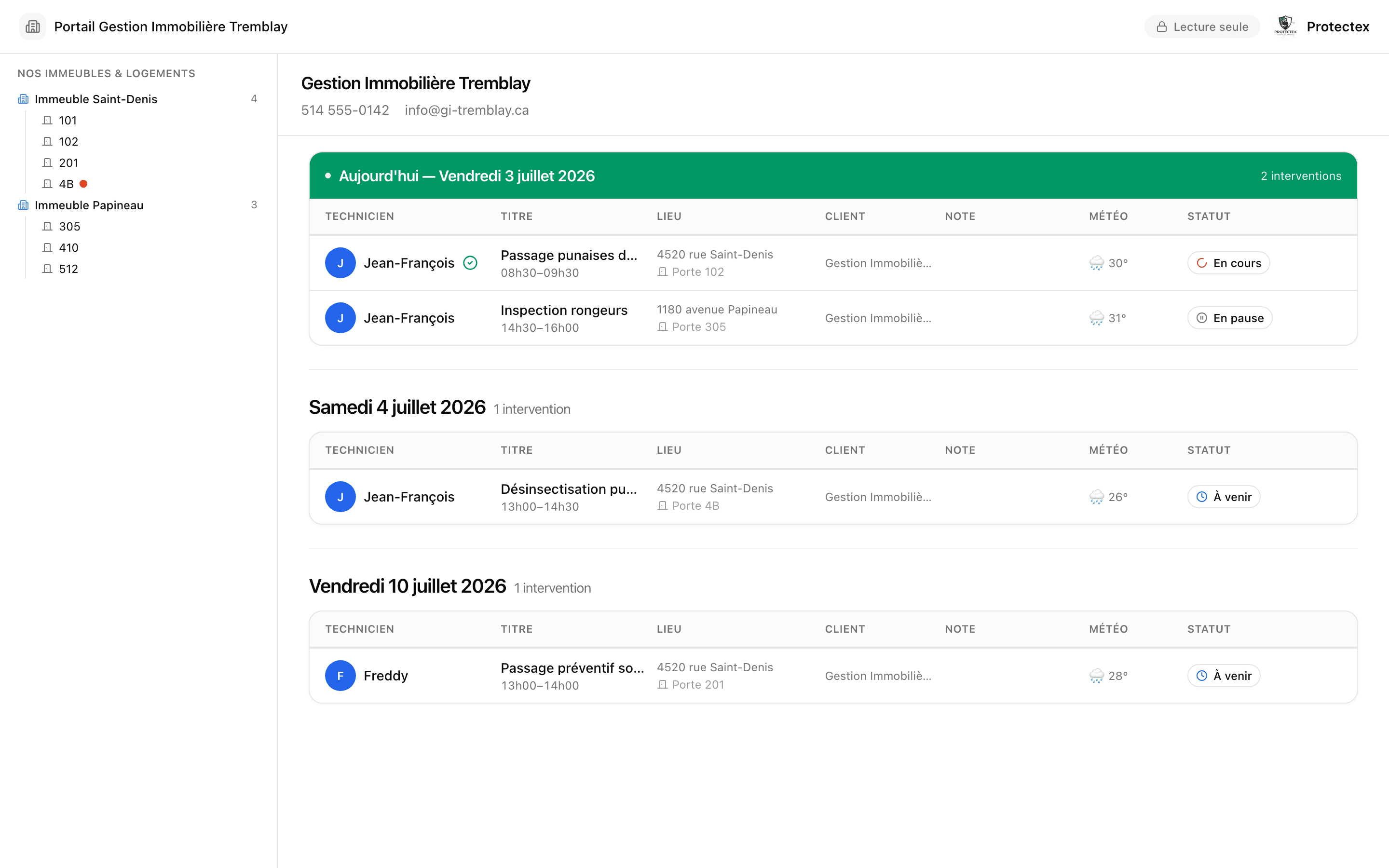
The client sees their own portfolio, and nothing else. You share a private read-only link with them, with no account to create, showing their buildings, their units, upcoming visits and the full history, updated on its own. This is the part that changes the commercial relationship. Notes you flag as private stay invisible to them. A manager who checks your interface several times a week stops seeing you as an interchangeable supplier, you become the system they rely on.
Why does the gap show in the first minute?
A good share of the tools in this sector were designed for a desktop computer, then adapted to the phone once technicians started asking for something portable. You feel it immediately, stacked menus, buttons too small, a screen that makes you pinch to zoom. Atlas was built the other way around. The technician space was born on the phone, it works one-handed, with gloves on, in a building hallway.
On performance, there is nothing to install and nothing to update. Atlas runs in the browser, the technician opens a link and they are in, with no account to create and no password to remember. The space keeps working on a weak signal, which matters in a basement or an underground parking lot. When we fix something, everyone has it the next morning, without a single technician downloading anything.
On design, the choice is to remove rather than add. The technician sees a list, their jobs for the day, and a checkbox. No dashboard, no statistics, no three-level menu. The dispatcher sees a week and moves a job with the mouse. The client sees their portfolio and nothing else. Every screen shows only what the person in front of it has to decide, and that is what makes the tool adoptable by a crew that has never used software before.
What does Atlas not do?
Atlas has invoiced since August 2026, with your province's taxes and the PDF emailed to the client, but it keeps no books and takes no card payments. It handles neither job photos, nor route optimization, nor e-signature. Worth saying up front, it saves bad surprises. If you want a single tool that runs all the way to collection and accounting, look at Jobber or Plannit instead, which cover that ground and which we name in our comparison. Atlas makes the opposite choice, concentrating everything on field work in pest control.
That said, none of this is set in stone. Atlas is developed continuously, and several of these gaps are landing in upcoming versions. That is the upside of software that is young and developed continuously, a request from a company using it goes straight into development instead of waiting for one big annual update. And since everything runs in the browser, the new features simply show up, with nothing to download and nothing extra to pay.
Does the software really work in French?
Many pest control tools are built in the United States and only exist in English, or ship a partial translation that stops at the menus. On the ground that means a technician hesitating over a button, and a French-speaking property manager receiving updates in a language they would rather not read. Atlas is bilingual end to end, the office interface, the technician space and the portal shared with the client.
Do needs change between Montreal, Quebec City and the regions?
Atlas is already in use in Quebec, notably in Montreal. Needs shift from one region to the next. On the island of Montreal and in Laval, density dominates, with property managers running dozens of buildings and demanding transparency. In Longueuil and on the South Shore, the residential and commercial mix calls for flexibility in the schedule. Around Quebec City, Gatineau, Sherbrooke or Trois-Rivieres, the distance between two visits weighs more, and the value sits in planning the week rather than in cramming jobs into a day. The software is the same everywhere, what differs is how you lay out the week.
Where do you start to try Atlas?
The demo is open, with no account and no card. You open the three interfaces in a few minutes, the office one, the technician one and the client one, and you see right away whether the logic matches how you work. If it does, Atlas costs CA$59.99 a month in Canada, with no commitment and nothing to install.